Changelog
Limit Parameter Now Prevents Important Flag Auto-Apply
Version Information
TypeScript/JavaScript
- Package:
@composio/coreand all provider packages - Version:
0.6.3+ - PR: #2570
The important flag auto-apply logic has been updated to respect the limit parameter. When you provide a limit, the SDK no longer automatically applies important: true, ensuring you get the exact number of tools you requested.
What Changed
Previously, when querying tools by toolkit with both toolkits and limit parameters, the SDK would auto-apply important: true. This could result in returning fewer tools than the requested limit if the toolkit had limited important tools.
Before:
// Could return < 50 tools if only 10 important tools exist
const tools = await composio.tools.get('default', {
  toolkits: ['github'],
  limit: 50,
});
// Result: Only 10 tools (important ones only)
After:
// Returns exactly 50 tools (or all available if < 50)
const tools = await composio.tools.get('default', {
  toolkits: ['github'],
  limit: 50,
});
// Result: 50 tools (including non-important)
Auto-Apply Logic
The important flag is now auto-applied only when ALL of these conditions are met:
toolkitsis providedtoolsis NOT providedtagsis NOT providedsearchis NOT providedlimitis NOT provided ← NEWimportantis NOT explicitly set tofalse
Examples
Auto-Applies Important (No Limit)
const tools = await composio.tools.get('default', {
  toolkits: ['github'],
});
// Returns: ~10-20 important tools
Does NOT Auto-Apply (Limit Provided)
const tools = await composio.tools.get('default', {
  toolkits: ['github'],
  limit: 50,
});
// Returns: Exactly 50 tools (or all available)
Explicit Important Overrides
const tools = await composio.tools.get('default', {
  toolkits: ['github'],
  limit: 50,
  important: true,
});
// Returns: Up to 50 important tools
Prevents Auto-Apply (Tags Provided)
const tools = await composio.tools.get('default', {
  toolkits: ['github'],
  tags: ['important'],
});
// Returns: GitHub tools with 'important' tag (no auto-apply)
Prevents Auto-Apply (Search Provided)
const tools = await composio.tools.get('default', {
  toolkits: ['github'],
  search: 'repository',
});
// Returns: GitHub tools matching search (no auto-apply)
Why This Matters
When you provide a limit, you're explicitly requesting a specific number of tools. Auto-applying the important filter could prevent you from getting the requested number of tools. This change respects user intent and makes the SDK behavior more predictable.
Use cases:
- Pagination: Get exactly N tools per page
- Performance: Limit tool count for faster responses
- UI constraints: Display a specific number of tools in your interface
Backward Compatibility
This change is backward compatible with one caveat:
- No code changes needed for most users
- If you were relying on automatic
importantfiltering withlimit, you now need to explicitly passimportant: true
Migration (if needed):
// Before (relied on auto-apply even with limit)
const tools = await composio.tools.get('default', {
  toolkits: ['github'],
  limit: 20,
});

// After (explicit important flag)
const tools = await composio.tools.get('default', {
  toolkits: ['github'],
  limit: 20,
  important: true, // Explicitly set if you want important tools
});
Documentation
Full documentation with more examples is available in the Tools API Reference.
Expanded Typed Responses with GitHub, Mailchimp & Trello - Planning Further Expansion
We've expanded our typed response support to include three major toolkits—GitHub, Mailchimp, and Trello—while also adding more typed actions across previously updated toolkits. All outputs now return strongly typed objects with clear field documentation instead of generic response_data blobs, enabling better IDE support and more reliable agent interactions.
Breaking Change for latest Version
If you're using the latest version and your code depends on the old response_data structure for GitHub, Mailchimp, or Trello, you'll need to update your code to work with the new typed response schemas.
Why This Matters
- Enhanced type safety: GitHub, Mailchimp, and Trello now have fully typed responses
- Expanded action coverage: More actions in existing toolkits now return typed data
- Improved developer experience: Better autocomplete and field validation across all toolkits
- Agent-friendly schemas: Cleaner output shapes reduce parsing errors and improve AI tool usage
Coming Soon: 40+ More Toolkits
We're planning to expand typed response coverage to 40+ additional toolkits in upcoming releases.
Simplified Schemas for Optional Fields
Tool schemas are now cleaner for optional fields by removing redundant anyOf: [{type}, {type: "null"}] constructs.
Background: How JSON Schema Handles Optional Fields
In JSON Schema, there are two distinct concepts:
| Concept | Meaning | How it's expressed |
|---|---|---|
| Optional | Field can be omitted entirely | Field is NOT in the required array |
| Nullable | Field accepts null as a value | anyOf: [{type}, {type: "null"}] |
Previously, our schemas used anyOf with null type for all optional fields—even when the field wasn't in required. This was redundant: if a field can be omitted, explicitly marking it as "accepts null" adds no value.
What Changed
For fields that are not in the required array, the schema processing now:
- Removes the redundant
{type: "null"}fromanyOfarrays - Removes
default: nullsince it's implied by being optional - Flattens single-type
anyOfto directtypedeclarations
Before vs After
For example, the page_token field in GOOGLECALENDAR_LIST_CALENDARS (which is optional/not required):
Previous (verbose):
{
  "page_token": {
    "anyOf": [
      { "type": "string" },
      { "type": "null" }
    ],
    "default": null,
    "description": "Token for the page of results to return...",
    "title": "Page Token"
  }
}
Now (simplified):
{
  "page_token": {
    "type": "string",
    "description": "Token for the page of results to return...",
    "title": "Page Token"
  }
}
What's Preserved
- Required nullable fields: Fields in the
requiredarray that accept null still useanyOfwith null type - Union types: Fields accepting multiple value types (e.g.,
string | number) retain their fullanyOfarray
Why This Matters
- Fewer tokens: Simpler schemas reduce token usage when tools are passed to LLMs
- Better compatibility: Some code generators and validators handle direct types better than
anyOfconstructs - Clearer semantics: Non-required fields don't need explicit null type—being optional already implies they can be omitted
SDK 0.6.0 Major Update: Cloudflare Workers Support and Breaking Changes
Version Information
TypeScript/JavaScript
- Package:
@composio/coreand all provider packages - Version:
0.6.0+
Python
- Package:
composioand all provider packages - Version:
0.11.0+
This major release focuses on Cloudflare Workers compatibility, platform-specific optimizations, and critical bug fixes. It includes breaking changes in both TypeScript and Python SDKs.
Breaking Changes: This release includes breaking changes that require code modifications:
TypeScript:
- Webhook verification: Now async + signature changed (must add
await+ new required params:id,timestamp) - Mastra provider updated to v1 API
Python:
- Webhook verification: Signature changed (new required parameters:
id,timestamp- still synchronous)
See the Migration Guide for detailed upgrade instructions.
Breaking Changes
1. Webhook Verification Breaking Changes
TypeScript PR: #2436 | Python PR: #2361
The webhook verification API has breaking changes in both SDKs to support multiple webhook versions (v1, v2, v3) and edge runtime compatibility.
TypeScript: Now Async + Signature Changed
The verifyWebhook() method has two breaking changes: it's now async AND requires additional parameters.
Before:
import { Composio } from '@composio/core';

const composio = new Composio();

// Old signature - synchronous, fewer parameters
const payload = composio.triggers.verifyWebhook({
  payload: req.body.toString(),
  signature: req.headers['x-composio-signature'] as string,
  secret: process.env.COMPOSIO_WEBHOOK_SECRET!,
});
// Returns: TriggerEvent
After:
import { Composio } from '@composio/core';

const composio = new Composio();

// New signature - async, requires id and timestamp
const result = await composio.triggers.verifyWebhook({
  id: req.headers['webhook-id'] as string, // NEW: required
  payload: req.body.toString(),
  secret: process.env.COMPOSIO_WEBHOOK_SECRET!,
  signature: req.headers['webhook-signature'] as string, // header name changed
  timestamp: req.headers['webhook-timestamp'] as string, // NEW: required
  tolerance: 300, // optional, default 300 seconds
});
// Returns: VerifyWebhookResult with version info
Key Changes:
- ⚠️ Now async - Must use
await - ⚠️ New required parameter:
id(fromwebhook-idheader) - ⚠️ New required parameter:
timestamp(fromwebhook-timestampheader) - ⚠️ Header name changed:
x-composio-signature→webhook-signature - ⚠️ Return type changed:
TriggerEvent→VerifyWebhookResult
Why?
- Cloudflare Workers compatibility - uses Web Crypto API instead of
node:crypto - Supports v1, v2, and v3 webhook formats with improved signature verification
Python: Signature Changed (v1/v2/v3 Support)
The method signature changed to support new webhook versions and requires additional headers.
Before:
from composio import Composio

composio = Composio()

# Old signature - fewer parameters
event = composio.triggers.verify_webhook(
    payload=request.get_data(as_text=True),
    signature=request.headers.get('x-composio-signature'),
    secret=os.environ['COMPOSIO_WEBHOOK_SECRET'],
)
# Returns: TriggerEvent
After:
from composio import Composio

composio = Composio()

# New signature - requires id and timestamp headers
result = composio.triggers.verify_webhook(
    id=request.headers.get('webhook-id'),           # NEW: required
    payload=request.get_data(as_text=True),
    secret=os.environ['COMPOSIO_WEBHOOK_SECRET'],
    signature=request.headers.get('webhook-signature'),  # header name changed
    timestamp=request.headers.get('webhook-timestamp'),  # NEW: required
    tolerance=300,  # optional
)
# Returns: VerifyWebhookResult with version info
Key Changes:
- ✅ Still synchronous (no
awaitneeded) - ⚠️ New required parameter:
id(webhook-id header) - ⚠️ New required parameter:
timestamp(webhook-timestamp header) - ⚠️ Header name changed:
x-composio-signature→webhook-signature - ⚠️ Return type changed:
TriggerEvent→VerifyWebhookResult - ⚠️ All parameters now keyword-only (must use
param=value)
Why? Supports v1, v2, and v3 webhook formats with improved signature verification.
2. Mastra v1 Provider Update
PR: #2433
The @composio/mastra provider has been updated to support Mastra v1, which has breaking API changes from v0.x.
Before (Mastra v0.x)
import { MastraProvider } from '@composio/mastra';
import { Mastra } from '@mastra/core';

const mastra = new Mastra({
  /* v0 config */
});
const provider = new MastraProvider();

// v0 API usage
const tools = await provider.wrapTools(composioTools);
After (Mastra v1)
import { MastraProvider } from '@composio/mastra';
import { Mastra } from '@mastra/core';

const mastra = new Mastra({
  /* v1 config */
});
const provider = new MastraProvider({ mastra });

// v1 API - different tool format
const tools = await provider.wrapTools(composioTools);
Changes Required
- Update Mastra dependency:
npm install @mastra/core@latest - Update provider initialization: Pass Mastra instance to provider
- Update tool handling: Mastra v1 uses different tool schema format
- Check Zod version: Mastra v1 supports both Zod v3 and v4
- Check Node.js version: Mastra v1 requires Node.js v22.13.0 or higher
We've added comprehensive E2E tests for both Zod v3 and v4 compatibility with Mastra v1 and Tool Router integration.
Major Features
3. Platform-Specific File Tool Modifier
PR: #2437
Separate implementations for Node.js and Cloudflare Workers to optimize file handling for each runtime.
Key Improvements:
- Node.js: Uses native file system APIs for better performance
- Cloudflare Workers: Uses platform-specific APIs, avoids Node.js-only code
- Automatic selection: SDK automatically picks the right implementation
- No code changes needed: Works transparently
Related Change: This platform-agnostic approach is why composio.triggers.verifyWebhook() became async in Breaking Change #1. Node.js node:crypto is mostly synchronous, but the standard globalThis.crypto (Web Crypto API) available in Cloudflare Workers is async. To support both platforms with a single API, the method had to become async.
4. Platform-Specific Config Defaults
PR: #2437
Different default configurations for different runtimes to optimize behavior.
Changed the autoUploadDownloadFiles default configuration for the Cloudflare Workers runtime, to avoid triggering runtime errors on unsupported features.
Cloudflare Workers defaults:
{
  autoUploadDownloadFiles: false; // We don't currently support file uploads/downloads in Cloudflare Workers
}
Benefits:
- Zero config for common use cases
- Optimized for each platform's strengths
- Override defaults when needed
5. Node Buffer → Uint8Array Refactoring
PR: #2438
All node:buffer usage replaced with standard Uint8Array for universal compatibility.
Impact:
- Works in Node.js and Cloudflare Workers
- ESLint rules enforce this pattern going forward
- Better type safety with standard types
- Fully backward compatible - no code changes needed
Why This Matters: Removing Node.js-specific APIs like node:buffer and node:crypto enables Cloudflare Workers support. Cloudflare Workers don't have access to Node.js built-in modules, so we use Web Standard APIs (Uint8Array, globalThis.crypto) that work in both Node.js and Cloudflare Workers.
Bug Fixes
6. Tool Fetching with Specific Version
PR: #2518
Fixed issues when executing tools with version constraints.
Before (Bug)
// This would fail or fetch wrong version
await composio.tools.execute('GITHUB_CREATE_ISSUE', {
  userId: 'user_123',
  version: '1.2.0', // Version constraint ignored
  arguments: {
    /* ... */
  },
});
After (Fixed)
// Now correctly respects version constraint
await composio.tools.execute('GITHUB_CREATE_ISSUE', {
  userId: 'user_123',
  version: '1.2.0', // Version constraint honored
  arguments: {
    /* ... */
  },
});
Test Coverage: Added 174 new test cases to prevent regression.
7. Python JSON Schema Default Values
PR: #2506
Fixed type coercion for stringified default values in JSON schemas.
Before (Bug)
# Schema with stringified default
{
  "type": "integer",
  "default": "42"  # String instead of int
}

# Would cause runtime errors
After (Fixed)
# SDK automatically coerces to correct type
{
  "type": "integer",
  "default": 42  # Properly coerced to int
}

# Works correctlyImpact: Fixes runtime errors with tools that have stringified defaults in their schemas.
8. Salesforce Type Error Fix
PR: #2426
Fixed SALESFORCE_CREATE_LEAD type error with custom_fields parameter.
Before (Bug)
# Would fail with type error
composio.tools.execute('SALESFORCE_CREATE_LEAD', {
    'user_id': 'user_123',
    'arguments': {
        'custom_fields': {
            'CustomField__c': 'value'
        }
    }
})
After (Fixed)
# Now works correctly
composio.tools.execute('SALESFORCE_CREATE_LEAD', {
    'user_id': 'user_123',
    'arguments': {
        'custom_fields': {
            'CustomField__c': 'value'
        }
    }
})
Technical Details: Implemented proper support for anyOf and allOf JSON Schema constructs in Python SDK.
Migration Guide
Step 1: Update Dependencies
@composio/openai@latest npm update @composio/anthropic@latest npm update @composio/vercel@latest
# etc. ```
</Tab>
<Tab value="pnpm">
```bash pnpm update @composio/core@latest # Update provider packages if using them pnpm update
@composio/openai@latest pnpm update @composio/anthropic@latest pnpm update
@composio/vercel@latest # etc. ```
</Tab>
<Tab value="yarn">
```bash yarn upgrade @composio/core@latest # Update provider packages if using them yarn upgrade
@composio/openai@latest yarn upgrade @composio/anthropic@latest yarn upgrade
@composio/vercel@latest # etc. ```
</Tab>
<Tab value="pip">```bash pip install --upgrade composio ```</Tab>
<Tab value="uv">```bash uv pip install --upgrade composio ```</Tab>
</Tabs>

---

### Step 2: Update Webhook Verification (Required)

<Tabs groupId="language" items={['TypeScript', 'Python']} persist>
<Tab value="TypeScript">

**Update signature with new parameters and add `await`:**

```typescript
// @noErrors
// Before - old signature
const payload = composio.triggers.verifyWebhook({
payload: req.body.toString(),
signature: req.headers['x-composio-signature'] as string,
secret: process.env.COMPOSIO_WEBHOOK_SECRET!,
});

// After - new signature with await and additional parameters
const result = await composio.triggers.verifyWebhook({
id: req.headers['webhook-id'] as string, // NEW
payload: req.body.toString(),
secret: process.env.COMPOSIO_WEBHOOK_SECRET!,
signature: req.headers['webhook-signature'] as string, // header name changed
timestamp: req.headers['webhook-timestamp'] as string, // NEW
});

// Access the normalized payload and version info
const event = result.payload;
const version = result.version; // 'V1', 'V2', or 'V3'
Express.js Example:
import express from 'express';
import { Composio } from '@composio/core';

const app = express();
const composio = new Composio();

// Make route handler async
app.post('/webhook', express.raw({ type: 'application/json' }), async (req, res) => {
  try {
    // New signature with all required headers
    const result = await composio.triggers.verifyWebhook({
      id: req.headers['webhook-id'] as string,
      payload: req.body.toString(),
      secret: process.env.COMPOSIO_WEBHOOK_SECRET!,
      signature: req.headers['webhook-signature'] as string,
      timestamp: req.headers['webhook-timestamp'] as string,
    });

    // Access verified webhook data
    console.log('Webhook version:', result.version);
    console.log('Received trigger:', result.payload.triggerSlug);

    res.status(200).send('OK');
  } catch (error) {
    console.error('Webhook verification failed:', error);
    res.status(401).send('Unauthorized');
  }
});
Cloudflare Workers Example:
import { Composio } from '@composio/core';

export default {
  async fetch(request: Request, env: Env): Promise<Response> {
    const composio = new Composio({ apiKey: env.COMPOSIO_API_KEY });

    try {
      const body = await request.text();

      // Now works in Cloudflare Workers!
      const result = await composio.triggers.verifyWebhook({
        id: request.headers.get('webhook-id') || '',
        payload: body,
        secret: env.COMPOSIO_WEBHOOK_SECRET,
        signature: request.headers.get('webhook-signature') || '',
        timestamp: request.headers.get('webhook-timestamp') || '',
      });

      // Process verified webhook
      console.log('Trigger:', result.payload.triggerSlug);

      return new Response('OK', { status: 200 });
    } catch (error) {
      return new Response('Unauthorized', { status: 401 });
    }
  },
};
Update signature to include new required parameters:
# Before - old signature
event = composio.triggers.verify_webhook(
    payload=request.get_data(as_text=True),
    signature=request.headers.get('x-composio-signature'),
    secret=os.environ['COMPOSIO_WEBHOOK_SECRET'],
)

# After - new signature with additional parameters
result = composio.triggers.verify_webhook(
    id=request.headers.get('webhook-id'),           # NEW
    payload=request.get_data(as_text=True),
    secret=os.environ['COMPOSIO_WEBHOOK_SECRET'],
    signature=request.headers.get('webhook-signature'),  # header name changed
    timestamp=request.headers.get('webhook-timestamp'),  # NEW
)

# Access the normalized payload
event = result['payload']
# Check webhook version
version = result['version']  # 'V1', 'V2', or 'V3'
FastAPI Example:
from fastapi import FastAPI, Request, HTTPException
from composio import Composio
import os

app = FastAPI()
composio = Composio()

@app.post("/webhook")
def webhook(request: Request):  # Still synchronous!
    # New signature with all required headers
    try:
        result = composio.triggers.verify_webhook(
            id=request.headers.get('webhook-id', ''),
            payload=request.body().decode('utf-8'),
            secret=os.environ['COMPOSIO_WEBHOOK_SECRET'],
            signature=request.headers.get('webhook-signature', ''),
            timestamp=request.headers.get('webhook-timestamp', ''),
        )

        # Access normalized payload and version info
        print(f"Webhook version: {result['version']}")
        print(f"Trigger: {result['payload']['trigger_slug']}")

        return {"success": True}
    except Exception as e:
        raise HTTPException(status_code=401, detail=str(e))
Flask Example:
from flask import Flask, request
from composio import Composio
import os

app = Flask(__name__)
composio = Composio()

@app.route('/webhook', methods=['POST'])
def webhook():  # Still synchronous!
    try:
        result = composio.triggers.verify_webhook(
            id=request.headers.get('webhook-id', ''),
            payload=request.get_data(as_text=True),
            secret=os.environ['COMPOSIO_WEBHOOK_SECRET'],
            signature=request.headers.get('webhook-signature', ''),
            timestamp=request.headers.get('webhook-timestamp', ''),
        )

        # Process verified webhook
        event = result['payload']
        return 'OK', 200
    except Exception as e:
        return 'Unauthorized', 401
Step 3: Update Mastra Integration (If Using)
Only required if you use @composio/mastra provider
bash # Update to Mastra v1 npm install @mastra/core@latest @composio/mastra@latest
bash pnpm update @mastra/core@latest @composio/mastra@latest bash yarn upgrade @mastra/core@latest @composio/mastra@latest Update your code:
// Before
import { MastraProvider } from '@composio/mastra';

const provider = new MastraProvider();

// After
import { MastraProvider } from '@composio/mastra';
import { Mastra } from '@mastra/core';

const mastra = new Mastra({
  // Your Mastra v1 config
});

const provider = new MastraProvider({ mastra });
Zod Compatibility: Mastra v1 works with both Zod v3 and v4. We test both versions in CI to ensure compatibility.
Step 4: Test Your Integration
- Run your test suite to catch any issues
- Test webhook verification if you use triggers
- Test file uploads/downloads - behavior improved but API unchanged
- Test in your target runtime (Node.js, Cloudflare Workers, etc.)
Backward Compatibility
Fully Compatible (No Changes Needed)
The following features work without any code changes:
- ✅ All tool execution APIs
- ✅ Connected accounts management
- ✅ Authentication flows
- ✅ Custom tools
- ✅ Tool Router sessions
- ✅ File upload/download (API unchanged, implementation improved)
- ✅ All provider packages (except Mastra)
- ✅ Python SDK usage (except webhook verification)
Requires Changes
The following features require code updates:
- ⚠️ Webhook verification (TypeScript) - Must add
awaitAND addid+timestampparameters, update header names - ⚠️ Webhook verification (Python) - Must add
id+timestampparameters, update header names (still synchronous) - ⚠️ Mastra integration (TypeScript only) - Must update to v1 API
Impact Summary
| Change | TypeScript Breaking | Python Breaking | Migration Required | Effort |
|---|---|---|---|---|
| Webhook verification - TypeScript | ✅ Yes (async + signature) | N/A | ✅ Required | Medium - Add await + params |
| Webhook verification - Python | N/A | ✅ Yes (signature only) | ✅ Required | Low - Add parameters |
| Mastra v1 support | ✅ Yes | N/A | ✅ Required (if using) | Medium - Update API |
| Platform-specific file modifier | ❌ No | ❌ No | ❌ Optional | None - Automatic |
| Config defaults | ❌ No | ❌ No | ❌ Optional | None - Automatic |
| Buffer → Uint8Array | ❌ No | N/A | ❌ Optional | None - Automatic |
| Tool version fix | ❌ No | ❌ No | ❌ Optional | None - Automatic |
| JSON schema coercion | ❌ No | ❌ No | ❌ Optional | None - Automatic |
| Salesforce type fix | ❌ No | ❌ No | ❌ Optional | None - Automatic |
Cloudflare Workers Support
This release adds support for Cloudflare Workers:
import { Composio } from '@composio/core';

export default {
  async fetch(request: Request, env: Env): Promise<Response> {
    const composio = new Composio({
      apiKey: env.COMPOSIO_API_KEY,
    });

    // SDK now works in Cloudflare Workers!
    const tools = await composio.tools.get('user_123', {
      toolkits: ['github'],
    });

    const result = await composio.tools.execute('GITHUB_CREATE_ISSUE', {
      userId: 'user_123',
      arguments: {
        /* ... */
      },
    });

    return new Response(JSON.stringify(result));
  },
};
Key Features Working in Cloudflare Workers:
- ✅ Tool execution
- ✅ Connected accounts
- ✅ Webhook verification
- ✅ File upload/download
- ✅ Custom tools
Testing
This release includes extensive E2E testing:
- ✅ Node.js: Both CJS and ESM compatibility tests
- ✅ Cloudflare Workers: Multiple test suites including Tool Router
- ✅ Mastra v1: Tests for both Zod v3 and v4
- ✅ File handling: Comprehensive tests for all platforms
- ✅ Webhook verification: Tests for all supported runtimes
Total new tests: 200+ test cases added across TypeScript and Python SDKs.
Getting Help
If you encounter issues during migration:
- Check the docs: docs.composio.dev
- Join our Discord: discord.composio.dev
- Open an issue: github.com/ComposioHQ/composio/issues
- Email support: support@composio.dev
What's Next
Future releases will focus on:
- 🚀 Performance optimizations
- 🔧 More platform-specific improvements
- 📚 Enhanced TypeScript types
- 🛠️ New tool integrations
- 🔐 Advanced authentication flows
Stay tuned for updates!
Experimental Assistive Prompts and API Updates
Version Information
TypeScript/JavaScript
- Package:
@composio/core - Version:
0.5.5+
Python
- Package:
composio - Version:
0.10.10+
New Features
Experimental Assistive Prompt Configuration
Tool Router sessions now support experimental configuration for timezone-aware assistive prompts. When you provide a user's timezone, the session returns a contextual assistive prompt that includes timezone-specific guidance.
This is an experimental feature. The API may change or be removed in future versions.
from composio import Composio

composio = Composio()

session = composio.tool_router.create(
    user_id="user_123",
    toolkits=["github"],
    experimental={
        "assistive_prompt": {
            "user_timezone": "America/New_York",
        }
    },
)

# Access the generated assistive prompt
if session.experimental:
    print(session.experimental.assistive_prompt)
import { Composio } from "@composio/core";
const composio = new Composio();
const session = await composio.toolRouter.create("user_123", {
toolkits: ["github"],
experimental: {
assistivePrompt: {
userTimezone: "America/New_York",
},
},
});
// Access the generated assistive prompt
if (session.experimental) {
console.log(session.experimental.assistivePrompt);
}The experimental field is only available on sessions created with create(). Sessions retrieved with use() do not include the experimental data.
Toolkit Endpoint Method
The toolkit retrieve response now includes getCurrentUserEndpointMethod (TypeScript) / get_current_user_endpoint_method (Python) to indicate the HTTP method for the current user endpoint.
Breaking Changes
Trigger Pagination: page Replaced with cursor
The page parameter in listActive / list_active for trigger instances has been replaced with cursor for cursor-based pagination. There was a bug in earlier APIs which caused page param to be ignored, going ahead for pagination please use cursor instead.
# Before (deprecated)
triggers = composio.triggers.list_active(page=1, limit=10)

# After
triggers = composio.triggers.list_active(cursor="cursor_string", limit=10)
# Use response.next_cursor for the next page
// Before (deprecated)
const triggers = await composio.triggers.listActive({ page: 1, limit: 10 });
// After
const triggers2 = await composio.triggers.listActive({ cursor: "cursor_string", limit: 10 });
// Use response.nextCursor for the next pageImpact Summary
| Change | Runtime Breaking | TypeScript Breaking | Migration Required |
|---|---|---|---|
| Experimental assistive prompts | No | No | No |
getCurrentUserEndpointMethod field | No | No | No |
page → cursor in triggers | Yes | Yes | Yes (if using page) |
Migration Guide
If you are using the page parameter in listActive / list_active:
- Replace
pagewithcursor - For the first request, omit the
cursorparameter or passundefined/None - Use the
nextCursor/next_cursorfrom the response for subsequent requests
Connected Account Initiate Now Filters by ACTIVE Status
Version Information
TypeScript/JavaScript
- Package:
@composio/core - Version:
0.5.4+
Python
- Package:
composio - Version:
0.10.9+
The initiate() method now only considers ACTIVE connected accounts when checking for duplicates. Previously, expired or inactive accounts would incorrectly trigger the multiple accounts error.
What Changed
When calling connectedAccounts.initiate(), the SDK now filters by statuses: ["ACTIVE"] when checking for existing accounts. This prevents expired or inactive accounts from blocking new connection creation.
Before (Bug)
// Expired accounts would incorrectly trigger ComposioMultipleConnectedAccountsError
await composio.connectedAccounts.initiate(userId, authConfigId);
// ❌ Error: Multiple connected accounts found (even if they're all expired)
After (Fixed)
// Only ACTIVE accounts are considered
await composio.connectedAccounts.initiate(userId, authConfigId);
// ✅ Works - expired/inactive accounts are ignored
Affected SDKs
- TypeScript:
@composio/core - Python:
composio
Backward Compatibility
This is a bug fix with no breaking changes. The behavior now matches the expected intent of the multiple accounts check.
File Upload/Download Fixes for latest tool with anyOf, oneOf, and allOf Schemas
Version Information
TypeScript/JavaScript
- Package:
@composio/coreand provider packages - Version:
0.5.3+
Python
- Package:
composioand provider packages - Version:
0.10.8+
The file handling modifiers now properly handle file_uploadable and file_downloadable properties nested within anyOf, oneOf, and allOf JSON Schema declarations. Previously, only direct child properties (and partial allOf support) were detected for file upload/download transformations.
We recommend updating to version 0.5.3 (TypeScript) or 0.10.8 (Python) or later to ensure file uploads and downloads work correctly with tools that use union or intersection types in their schemas.
What Changed
Before (Bug)
File properties inside anyOf, oneOf, or allOf were not detected:
// This schema's file_uploadable was NOT being processed
inputParameters: {
  type: 'object',
  properties: {
    fileInput: {
      anyOf: [
        {
          type: 'string',
          file_uploadable: true  // ❌ Not detected
        },
        {
          type: 'null'
        }
      ]
    }
  }
}
After (Fixed)
File properties are now correctly detected and processed at any nesting level:
// Now properly detected and transformed
inputParameters: {
  type: 'object',
  properties: {
    fileInput: {
      anyOf: [
        {
          type: 'string',
          file_uploadable: true  // ✅ Detected and processed
        },
        {
          type: 'null'
        }
      ]
    }
  }
}
Affected Scenarios
| Scenario | Before | After |
|---|---|---|
file_uploadable in anyOf | Not detected | ✅ Works |
file_uploadable in oneOf | Not detected | ✅ Works |
file_uploadable in allOf | Not detected | ✅ Works |
file_downloadable in anyOf | Not detected | ✅ Works |
file_downloadable in oneOf | Not detected | ✅ Works |
file_downloadable in allOf | Not detected | ✅ Works |
| Nested objects inside union types | Not detected | ✅ Works |
| Array items with union types | Not detected | ✅ Works |
How to Update
TypeScript/JavaScript
npm update @composio/core@latestpnpm update @composio/core@latestyarn upgrade @composio/core@latestPython
pip install --upgrade composiouv pip install --upgrade composiopoetry update composioBackward Compatibility
This release is fully backward compatible:
- All existing code continues to work without modifications
- No migration required
- File upload/download for direct properties continues to work as before
- The fix only adds support for previously unsupported schema patterns
Impact Summary
| Change | Runtime Breaking | TypeScript Breaking | Migration Required |
|---|---|---|---|
anyOf support for file uploads | No | No | No |
oneOf support for file uploads | No | No | No |
allOf support for file uploads | No | No | No |
anyOf support for file downloads | No | No | No |
oneOf support for file downloads | No | No | No |
allOf support for file downloads | No | No | No |
File handling in tool execution now uses presigned URLs
Summary
Files involved in tool execution are now shared via presigned URLs with a default TTL (time-to-live) of 1 hour. You can customize the file TTL through your project configuration.
What changed
When tools return files (images, documents, exports, etc.), these files are now delivered as presigned URLs with a configurable TTL instead of non-expiring URLs. This provides:
- Automatic cleanup - Files expire after the configured TTL
- Configurable retention - Adjust file availability based on your application's needs
Default behavior
All files returned from tool execution now have a 1 hour TTL by default. After this period, the presigned URLs expire and files are no longer accessible.
Configuring file TTL
You can adjust the file TTL to match your application's needs.
Via Dashboard
- Navigate to Project Settings in your Composio dashboard
- Find the File TTL configuration option
- Set your desired TTL value
Via API
Use the Update Project Config API to programmatically configure the file TTL:
curl -X PATCH "https://backend.composio.dev/api/v3/org/projects/config" \
  -H "x-api-key: YOUR_API_KEY" \
  -H "Content-Type: application/json" \
  -d '{
    "fileTtl": 3600
  }'
Impact
| Aspect | Before | After |
|---|---|---|
| File delivery | Non-expiring URLs | Presigned URLs with TTL |
| Default expiry | None | 1 hour |
| TTL customization | Not available | Configurable via project settings |
Migration
No code changes are required. Your existing integrations will continue to receive file URLs as before, but these URLs will now expire after the configured TTL.
If your application stores or caches file URLs for later use, ensure you handle URL expiration appropriately by either:
- Downloading files before the TTL expires
- Re-executing the tool to obtain fresh URLs when needed
- Increasing the TTL via project settings to match your retention requirements
True PATCH Semantics for Auth Config Updates
Version Information
TypeScript/JavaScript
- Package:
@composio/coreand provider packages - Version:
0.5.1+
Python
- Package:
composio-coreand provider packages - Version:
0.10.7+
The PATCH /api/v3/auth_configs/{id} endpoint now implements proper partial update semantics. Previously, omitting fields would clear them (behaving like PUT). Now, omitted fields are preserved—only explicitly provided fields are modified.
Breaking Change: If you relied on omitting fields to clear them, you must now explicitly send null or []. See Migration Guide below.
What Changed
| Field | Before (Buggy) | After (Correct) |
|---|---|---|
credentials | Required on every update | Optional—merged with existing |
tool_access_config | Reset to {} if omitted | Preserved if omitted |
scopes (type: default) | Cleared if omitted | Preserved if omitted |
restrict_to_following_tools | Reset to [] if omitted | Preserved if omitted |
Merge Behavior: The credentials object is merged—send only the fields you want to change, and existing fields are preserved.
New Capabilities
Rotate a Single Credential Field
Update just client_secret without resending client_id or other fields:
from composio import Composio

composio = Composio()

# Only send the field you want to update - other credentials are preserved

composio.auth_configs.update(
    "ac_yourAuthConfigId",
    options={
        "type": "custom",
        "credentials": {
            "client_secret": "new_rotated_secret",
        },
    },
)
import { Composio } from "@composio/core";
const composio = new Composio();
// Only send the field you want to update - other credentials are preserved
await composio.authConfigs.update("ac_yourAuthConfigId", {
type: "custom",
credentials: {
client_secret: "new_rotated_secret",
},
});Update Tool Restrictions Without Touching Credentials
Previously, this would fail because credentials was required. Now it works:
from composio import Composio

composio = Composio()

# Update tool restrictions - credentials are automatically preserved

composio.auth_configs.update(
    "ac_yourAuthConfigId",
    options={
        "type": "custom",
        "tool_access_config": {
            "tools_available_for_execution": ["GMAIL_SEND_EMAIL", "GMAIL_READ_EMAIL"],
        },
    },
)
import { Composio } from "@composio/core";
const composio = new Composio();
// Note: TypeScript SDK currently requires credentials for custom type updates
await composio.authConfigs.update("ac_yourAuthConfigId", {
type: "custom",
credentials: {
// Include existing credentials when using TS SDK
},
toolAccessConfig: {
toolsAvailableForExecution: ["GMAIL_SEND_EMAIL", "GMAIL_READ_EMAIL"],
},
});Migration Guide
Am I Affected?
Yes, if your code relied on omitting fields to clear them.
No, if you always send complete payloads or only use PATCH to update specific fields.
How to Clear Fields Explicitly
| To Clear | Python SDK | TypeScript SDK |
|---|---|---|
tool_access_config | "tool_access_config": {"tools_available_for_execution": []} | toolAccessConfig: { toolsAvailableForExecution: [] } |
scopes (default) | "scopes": "" | scopes: "" (via HTTP API) |
from composio import Composio

composio = Composio()

# Explicitly clear tool restrictions with empty array

composio.auth_configs.update(
    "ac_yourAuthConfigId",
    options={
        "type": "custom",
        "tool_access_config": {
            "tools_available_for_execution": [],
        },
    },
)
import { Composio } from "@composio/core";
const composio = new Composio();
// Explicitly clear tool restrictions with empty array
await composio.authConfigs.update("ac_yourAuthConfigId", {
type: "custom",
credentials: {
// Include existing credentials when using TS SDK
},
toolAccessConfig: {
toolsAvailableForExecution: [],
},
});Raw HTTP API
For users calling the API directly:
# Rotate single credential
curl -X PATCH "https://backend.composio.dev/api/v3/auth_configs/{id}" \
  -H "x-api-key: YOUR_API_KEY" \
  -H "Content-Type: application/json" \
  -d '{"type": "custom", "credentials": {"client_secret": "new_secret"}}'

# Clear tool restrictions
curl -X PATCH "https://backend.composio.dev/api/v3/auth_configs/{id}" \
  -H "x-api-key: YOUR_API_KEY" \
  -H "Content-Type: application/json" \
-d '{"type": "custom", "tool_access_config": {"tools_available_for_execution": []}}'Tool Router Improvements and New Features
Version Information
TypeScript/JavaScript
- Package:
@composio/coreand provider packages - Version:
0.3.4to0.4.0
Python
- Package:
composio-coreand provider packages - Version:
0.10.4to0.10.5
New Features
1. Wait for Connections Property
Added waitForConnections (TypeScript) / wait_for_connections (Python) property to manage connections configuration. This allows tool router sessions to wait for users to complete authentication before proceeding to the next step.
TypeScript:
const session = await composio.toolRouter.create(userId, {
  manageConnections: {
    enable: true,
    callbackUrl: 'https://example.com/callback',
    waitForConnections: true  // NEW
  }
});
Python:
session = tool_router.create(
    user_id="user_123",
    manage_connections={
        "enable": True,
        "callback_url": "https://example.com/callback",
        "wait_for_connections": True  # NEW
    }
)
2. Session-Specific Modifier Types
Introduced new modifier types for better session-based tool execution: SessionExecuteMetaModifiers and SessionMetaToolOptions.
TypeScript:
const tools = await session.tools({
  modifySchema: ({ toolSlug, toolkitSlug, schema }) => schema,
  beforeExecute: ({ toolSlug, toolkitSlug, sessionId, params }) => params,
  afterExecute: ({ toolSlug, toolkitSlug, sessionId, result }) => result
});
Python:
from composio.core.models import before_execute_meta, after_execute_meta

@before_execute_meta
def before_modifier(tool, toolkit, session_id, params):
    return params

@after_execute_meta
def after_modifier(tool, toolkit, session_id, response):
    return response

tools = session.tools(modifiers=[before_modifier, after_modifier])
3. Dedicated Method for Tool Router Meta Tools
Added getRawToolRouterMetaTools (TypeScript) / get_raw_tool_router_meta_tools (Python) method in the Tools class for fetching meta tools directly from a tool router session.
TypeScript:
const metaTools = await composio.tools.getRawToolRouterMetaTools('session_123', {
  modifySchema: ({ toolSlug, toolkitSlug, schema }) => {
    // Customize schema
    return schema;
  }
});
Python:
meta_tools = tools_model.get_raw_tool_router_meta_tools(
    session_id="session_123",
    modifiers=[schema_modifier]
)
Internal Improvements
1. Performance Optimization
Eliminated unnecessary tool fetching during tool router execution, resulting in faster tool execution with fewer API calls.
2. Improved Architecture
Tool router sessions now fetch tools directly from the session API endpoint instead of using tool slugs, providing better consistency and reliability.
3. Simplified Implementation
Removed redundant tool schema fetching in execution paths, using a hardcoded 'composio' toolkit slug for meta tools.
Backward Compatibility
This release is fully backward compatible:
- All existing code continues to work without modifications
- New properties are optional with sensible defaults
- New modifier types can be adopted incrementally
- Internal changes have no impact on public APIs
- No migration required
Impact Summary
| Change | Runtime Breaking | TypeScript Breaking | Migration Required |
|---|---|---|---|
wait_for_connections property | No | No | No |
| Session-specific modifiers | No | No | No |
getRawToolRouterMetaTools method | No | No | No |
| Tool router uses session API | No | No | No |
| Optimized tool execution | No | No | No |
All changes follow semantic versioning principles and maintain full backward compatibility.
Tool Enum Name Shortening
Shortened tool enum names across 181 actions to ensure compatibility with all AI agent frameworks.
Why This Change?
Some agent frameworks have a 64-character limit on tool/function names. Several tool enums exceeded this limit, causing compatibility issues.
No Action Required
This change will not break your integration if you are using latest toolkit versions or fetching tools dynamically. The SDK automatically resolves the correct tool names.
View All Enum Changes (181 tools)
| Old Enum | New Enum |
|---|---|
ACTIVE_TRAIL_GET_ACCOUNT_INTEGRATIONDATA_ACTIVECOMMERCE | ACTIVE_TRAIL_GET_ACCOUNT_INTEGRATIONDATA |
ACTIVE_TRAIL_GET_AUTOMATION_REPORTS_SMS_CAMPAIGN_SUMMARY_REPORT | ACTIVE_TRAIL_GET_AUTOMATION_REPORTS_SMS_CAMPAIGN_SUMMARY |
BIG_DATA_CLOUD_REVERSE_GEOCODING_WITH_TIMEZONE_API | BIG_DATA_CLOUD_REVERSE_GEOCODING_TIMEZONE_API |
CLICKSEND_RECHARGE_TRANSACTIONS_BY_TRANSACTION_ID_GET | CLICKSEND_RECHARGE_TXNS_BY_TXN_ID_GET |
CODEMAGIC_API_V3_VARIABLE_GROUPS_VARIABLE_GROUP_ID_UPDATE_GROUP | CODEMAGIC_API_V3_VARIABLE_GROUPS_VARIABLE_GROUP_ID_UPDATE |
COUPA_GET_ALL_FUNDS_TRANSFERS_IN_A_SPECIFIC_PAYMENT_BATCH_BY_PAYMENT_BATCH_ID | COUPA_GET_ALL_FUNDS_TRANSFERS_SPECIFIC_PAYMENT_BATCH |
COUPA_GET_PO_CONFIRMATION_IN_CANCELLED_STATUS_AND_NOT_EXPORTED | COUPA_GET_PO_CONFIRMATION_CANCELLED_STATUS_NOT_EXPORTED |
DATABRICKS_CATALOG_CREDENTIALS_GENERATE_TEMPORARY_SERVICE_CREDENTIAL | DATABRICKS_CATALOG_CREDS_GENERATE_TEMP_SERVICE_CRED |
DATABRICKS_CATALOG_CREDENTIALS_VALIDATE_CREDENTIAL | DATABRICKS_CATALOG_CREDS_VALIDATE_CRED |
DATABRICKS_CATALOG_EXTERNAL_METADATA_UPDATE_EXTERNAL_METADATA | DATABRICKS_CATALOG_EXTERNAL_METADATA_UPDATE_EXTERNAL |
DATABRICKS_CATALOG_RFA_GET_ACCESS_REQUEST_DESTINATIONS | DATABRICKS_CATALOG_RFA_GET_ACCESS_REQUEST_DESTS |
DATABRICKS_CATALOG_RFA_UPDATE_ACCESS_REQUEST_DESTINATIONS | DATABRICKS_CATALOG_RFA_UPDATE_ACCESS_REQUEST_DESTS |
DATABRICKS_CATALOG_TEMPORARY_PATH_CREDENTIALS_GENERATE_TEMPORARY_PATH_CREDENTIALS | DATABRICKS_CATALOG_TEMP_PATH_CREDS_GENERATE_TEMP_PATH_CREDS |
DATABRICKS_COMPUTE_CLUSTER_POLICIES_GET_PERMISSION_LEVELS | DATABRICKS_COMPUTE_CLUSTER_POLICIES_GET_PERM_LEVELS |
DATABRICKS_COMPUTE_CLUSTER_POLICIES_GET_PERMISSIONS | DATABRICKS_COMPUTE_CLUSTER_POLICIES_GET_PERMS |
DATABRICKS_COMPUTE_CLUSTER_POLICIES_SET_PERMISSIONS | DATABRICKS_COMPUTE_CLUSTER_POLICIES_SET_PERMS |
DATABRICKS_COMPUTE_CLUSTER_POLICIES_UPDATE_PERMISSIONS | DATABRICKS_COMPUTE_CLUSTER_POLICIES_UPDATE_PERMS |
DATABRICKS_COMPUTE_INSTANCE_POOLS_GET_PERMISSION_LEVELS | DATABRICKS_COMPUTE_INSTANCE_POOLS_GET_PERM_LEVELS |
DATABRICKS_COMPUTE_INSTANCE_POOLS_UPDATE_PERMISSIONS | DATABRICKS_COMPUTE_INSTANCE_POOLS_UPDATE_PERMS |
DATABRICKS_COMPUTE_POLICY_COMPLIANCE_FOR_CLUSTERS_ENFORCE_COMPLIANCE | DATABRICKS_COMPUTE_POLICY_COMPL_FOR_CLUSTERS_ENFORCE_COMPL |
DATABRICKS_COMPUTE_POLICY_COMPLIANCE_FOR_CLUSTERS_GET_COMPLIANCE | DATABRICKS_COMPUTE_POLICY_COMPL_FOR_CLUSTERS_GET_COMPL |
DATABRICKS_DASHBOARDS_GENIE_DELETE_CONVERSATION_MESSAGE | DATABRICKS_DASHBOARDS_GENIE_DELETE_CONV_MESSAGE |
DATABRICKS_DASHBOARDS_GENIE_EXECUTE_MESSAGE_ATTACHMENT_QUERY | DATABRICKS_DASHBOARDS_GENIE_EXECUTE_MESSAGE_ATTACH_QUERY |
DATABRICKS_DASHBOARDS_GENIE_GET_MESSAGE_ATTACHMENT_QUERY_RESULT | DATABRICKS_DASHBOARDS_GENIE_GET_MESSAGE_ATTACH_QUERY_RESULT |
DATABRICKS_DASHBOARDS_GENIE_GET_MESSAGE_QUERY_RESULT_BY_ATTACHMENT | DATABRICKS_DASHBOARDS_GENIE_GET_MESSAGE_QUERY_RESULT_ATTACH |
DATABRICKS_DASHBOARDS_GENIE_LIST_CONVERSATION_MESSAGES | DATABRICKS_DASHBOARDS_GENIE_LIST_CONV_MESSAGES |
DATABRICKS_DASHBOARDS_LAKEVIEW_EMBEDDED_GET_PUBLISHED_DASHBOARD_TOKEN_INFO | DATABRICKS_DASHBOARDS_LAKEVIEW_EMBEDDED_GET_PUBLISHED_DASH |
DATABRICKS_DATABASE_DATABASE_GENERATE_DATABASE_CREDENTIAL | DATABRICKS_DATABASE_DATABASE_GENERATE_DATABASE_CRED |
DATABRICKS_IAM_PERMISSION_MIGRATION_MIGRATE_PERMISSIONS | DATABRICKS_IAM_PERM_MIGRATION_MIGRATE_PERMS |
DATABRICKS_IAMV2_WORKSPACE_IAM_V2_GET_WORKSPACE_ACCESS_DETAIL_LOCAL | DATABRICKS_IAMV2_WORKSPACE_IAM_V2_GET_WORKSPACE_ACCESS |
DATABRICKS_JOB_PERMISSION_LEVELS_GETPERMISSIONLEVELS | DATABRICKS_JOB_PERM_LEVELS_GETPERMISSIONLEVELS |
DATABRICKS_JOBS_POLICY_COMPLIANCE_FOR_JOBS_GET_COMPLIANCE | DATABRICKS_JOBS_POLICY_COMPL_FOR_JOBS_GET_COMPL |
DATABRICKS_MARKETPLACE_CONSUMER_INSTALLATIONS_CREATE | DATABRICKS_MKTPLACE_CONSUMER_INSTALLATIONS_CREATE |
DATABRICKS_MARKETPLACE_CONSUMER_INSTALLATIONS_DELETE | DATABRICKS_MKTPLACE_CONSUMER_INSTALLATIONS_DELETE |
DATABRICKS_MARKETPLACE_CONSUMER_INSTALLATIONS_UPDATE | DATABRICKS_MKTPLACE_CONSUMER_INSTALLATIONS_UPDATE |
DATABRICKS_MARKETPLACE_CONSUMER_LISTINGS_BATCH_GET | DATABRICKS_MKTPLACE_CONSUMER_LISTINGS_BATCH_GET |
DATABRICKS_MARKETPLACE_CONSUMER_PERSONALIZATION_REQUESTS_GET | DATABRICKS_MKTPLACE_CONSUMER_PERSONALIZATION_REQUESTS_GET |
DATABRICKS_MARKETPLACE_CONSUMER_PROVIDERS_BATCH_GET | DATABRICKS_MKTPLACE_CONSUMER_PROVIDERS_BATCH_GET |
DATABRICKS_MARKETPLACE_PROVIDER_EXCHANGES_DELETE_LISTING_FROM_EXCHANGE | DATABRICKS_MKTPLACE_PROVIDER_EXCHANGES_DELETE_LISTING |
DATABRICKS_MARKETPLACE_PROVIDER_PROVIDER_ANALYTICS_DASHBOARDS_CREATE | DATABRICKS_MKTPLACE_PROVIDER_ANALYTICS_DASHBOARDS_CREATE |
DATABRICKS_MARKETPLACE_PROVIDER_PROVIDER_ANALYTICS_DASHBOARDS_GET | DATABRICKS_MKTPLACE_PROVIDER_ANALYTICS_DASHBOARDS_GET |
DATABRICKS_MARKETPLACE_PROVIDER_PROVIDER_ANALYTICS_DASHBOARDS_GET_LATEST_VERSION | DATABRICKS_MKTPLACE_PROVIDER_ANALYTICS_DASH_GET_LATEST |
DATABRICKS_ML_FEATURE_ENGINEERING_DELETE_KAFKA_CONFIG | DATABRICKS_ML_FEATURE_ENG_DELETE_KAFKA_CONFIG |
DATABRICKS_ML_MATERIALIZED_FEATURES_DELETE_FEATURE_TAG | DATABRICKS_ML_MAT_FEATURES_DELETE_FEATURE_TAG |
DATABRICKS_ML_MATERIALIZED_FEATURES_GET_FEATURE_TAG | DATABRICKS_ML_MAT_FEATURES_GET_FEATURE_TAG |
DATABRICKS_ML_MATERIALIZED_FEATURES_UPDATE_FEATURE_TAG | DATABRICKS_ML_MAT_FEATURES_UPDATE_FEATURE_TAG |
DATABRICKS_ML_MODEL_REGISTRY_GET_PERMISSION_LEVELS | DATABRICKS_ML_MODEL_REGISTRY_GET_PERM_LEVELS |
DATABRICKS_PIPELINES_PIPELINES_GET_PERMISSION_LEVELS | DATABRICKS_PIPELINES_PIPELINES_GET_PERM_LEVELS |
DATABRICKS_QUALITYMONITORV2_QUALITY_MONITOR_V2_CREATE_QUALITY_MONITOR | DATABRICKS_QUALITYMONITORV2_QUALITY_MONITOR_V2_CREATE |
DATABRICKS_SERVING_SERVING_ENDPOINTS_CREATE_PROVISIONED_THROUGHPUT_ENDPOINT | DATABRICKS_SERVING_SERVING_ENDPOINTS_CREATE_PROV_THPUT |
DATABRICKS_SERVING_SERVING_ENDPOINTS_GET_PERMISSION_LEVELS | DATABRICKS_SERVING_SERVING_ENDPOINTS_GET_PERM_LEVELS |
DATABRICKS_SETTINGS_AIBI_DASHBOARD_EMBEDDING_ACCESS_POLICY_DELETE | DATABRICKS_SETTINGS_AIBI_DASH_EMBEDDING_ACCESS_POLICY_DELETE |
DATABRICKS_SETTINGS_AIBI_DASHBOARD_EMBEDDING_ACCESS_POLICY_GET | DATABRICKS_SETTINGS_AIBI_DASH_EMBEDDING_ACCESS_POLICY_GET |
DATABRICKS_SETTINGS_AIBI_DASHBOARD_EMBEDDING_ACCESS_POLICY_UPDATE | DATABRICKS_SETTINGS_AIBI_DASH_EMBEDDING_ACCESS_POLICY_UPDATE |
DATABRICKS_SETTINGS_AIBI_DASHBOARD_EMBEDDING_APPROVED_DOMAINS_DELETE | DATABRICKS_SETTINGS_AIBI_DASH_EMBEDDING_DOMAINS_DELETE |
DATABRICKS_SETTINGS_AIBI_DASHBOARD_EMBEDDING_APPROVED_DOMAINS_GET | DATABRICKS_SETTINGS_AIBI_DASH_EMBEDDING_APPROVED_DOMAINS_GET |
DATABRICKS_SETTINGS_AIBI_DASHBOARD_EMBEDDING_APPROVED_DOMAINS_UPDATE | DATABRICKS_SETTINGS_AIBI_DASH_EMBEDDING_DOMAINS_UPDATE |
DATABRICKS_SETTINGS_COMPLIANCE_SECURITY_PROFILE_GET | DATABRICKS_SETTINGS_COMPL_SECURITY_PROFILE_GET |
DATABRICKS_SETTINGS_DASHBOARD_EMAIL_SUBSCRIPTIONS_DELETE | DATABRICKS_SETTINGS_DASH_EMAIL_SUBS_DELETE |
DATABRICKS_SETTINGS_DASHBOARD_EMAIL_SUBSCRIPTIONS_GET | DATABRICKS_SETTINGS_DASH_EMAIL_SUBS_GET |
DATABRICKS_SETTINGS_DASHBOARD_EMAIL_SUBSCRIPTIONS_UPDATE | DATABRICKS_SETTINGS_DASH_EMAIL_SUBS_UPDATE |
DATABRICKS_SETTINGS_ENABLE_EXPORT_NOTEBOOK_GET_ENABLE_EXPORT_NOTEBOOK | DATABRICKS_SETTINGS_ENABLE_EXPORT_NOTEBOOK_GET_ENABLE |
DATABRICKS_SETTINGS_ENABLE_EXPORT_NOTEBOOK_PATCH_ENABLE_EXPORT_NOTEBOOK | DATABRICKS_SETTINGS_ENABLE_EXPORT_NOTEBOOK_PATCH_ENABLE |
DATABRICKS_SETTINGS_ENABLE_NOTEBOOK_TABLE_CLIPBOARD_GET_ENABLE_NOTEBOOK_TABLE_CLIPBOARD | DATABRICKS_SETTINGS_ENABLE_NOTEBOOK_TABLE_CLIPBOARD_GET |
DATABRICKS_SETTINGS_ENABLE_NOTEBOOK_TABLE_CLIPBOARD_PATCH_ENABLE_NOTEBOOK_TABLE_CLIPBOARD | DATABRICKS_SETTINGS_ENABLE_NOTEBOOK_TABLE_CLIPBOARD_PATCH |
DATABRICKS_SETTINGS_ENABLE_RESULTS_DOWNLOADING_GET_ENABLE_RESULTS_DOWNLOADING | DATABRICKS_SETTINGS_ENABLE_RESULTS_DOWNLOADING_GET_ENABLE |
DATABRICKS_SETTINGS_LLM_PROXY_PARTNER_POWERED_WORKSPACE_DELETE | DATABRICKS_SETTINGS_LLM_PROXY_PARTNER_WORKSPACE_DELETE |
DATABRICKS_SETTINGS_LLM_PROXY_PARTNER_POWERED_WORKSPACE_UPDATE | DATABRICKS_SETTINGS_LLM_PROXY_PARTNER_WORKSPACE_UPDATE |
DATABRICKS_SETTINGS_NOTIFICATION_DESTINATIONS_CREATE | DATABRICKS_SETTINGS_NOTIF_DESTS_CREATE |
DATABRICKS_SETTINGS_NOTIFICATION_DESTINATIONS_DELETE | DATABRICKS_SETTINGS_NOTIF_DESTS_DELETE |
DATABRICKS_SETTINGS_NOTIFICATION_DESTINATIONS_UPDATE | DATABRICKS_SETTINGS_NOTIF_DESTS_UPDATE |
DATABRICKS_SETTINGS_TOKEN_MANAGEMENT_GET_PERMISSION_LEVELS | DATABRICKS_SETTINGS_TOKEN_MGMT_GET_PERM_LEVELS |
DATABRICKS_SETTINGS_TOKEN_MANAGEMENT_GET_PERMISSIONS | DATABRICKS_SETTINGS_TOKEN_MGMT_GET_PERMS |
DATABRICKS_SETTINGS_TOKEN_MANAGEMENT_SET_PERMISSIONS | DATABRICKS_SETTINGS_TOKEN_MGMT_SET_PERMS |
DATABRICKS_SETTINGS_TOKEN_MANAGEMENT_UPDATE_PERMISSIONS | DATABRICKS_SETTINGS_TOKEN_MGMT_UPDATE_PERMS |
DATABRICKS_SETTINGSV2_WORKSPACE_SETTINGS_V2_GET_PUBLIC_WORKSPACE_SETTING | DATABRICKS_SETTINGSV2_WORKSPACE_SETTINGS_V2_GET_PUBLIC |
DATABRICKS_SQL_STATEMENT_EXECUTION_CANCEL_EXECUTION | DATABRICKS_SQL_STATEMENT_EXEC_CANCEL_EXEC |
DATABRICKS_VECTORSEARCH_VECTOR_SEARCH_ENDPOINTS_CREATE_ENDPOINT | DATABRICKS_VECTORSEARCH_VECTOR_SEARCH_ENDPOINTS_CREATE |
DATABRICKS_VECTORSEARCH_VECTOR_SEARCH_INDEXES_UPSERT_DATA_VECTOR_INDEX | DATABRICKS_VECTORSEARCH_VECTOR_SEARCH_INDEXES_UPSERT_DATA |
DEPLOYHQ_DELETE_PROJECTS_PROJECT_BUILD_CACHE_FILES_IDENTIFIER | DEPLOYHQ_DELETE_PROJECTS_PROJECT_BUILD_CACHE_FILES |
DROPBOX_SIGN_EDIT_AND_RESEND_EMBEDDED_SIGNATURE_REQUEST_WITH_TEMPLATE | DROPBOX_SIGN_EDIT_RESEND_EMBEDDED_SIGNATURE_REQUEST_TEMPLATE |
GITHUB_CREATE_OR_UPDATE_CUSTOM_PROPERTIES_FOR_AN_ORGANIZATION | GITHUB_CREATE_OR_UPDATE_CUSTOM_PROPERTIES_FOR_AN_ORG |
GOOGLE_ANALYTICS_ANALYTICS_ADMIN_PROPERTIES_BIG_QUERY_LINKS_LIST | GOOGLE_ANALYTICS_ANALYTICS_ADMIN_PROPERTIES_BIG_QUERY_LINKS |
GOOGLE_ANALYTICS_ANALYTICSADMIN_PROPERTIES_CHANNELGROUPS_LIST | GOOGLE_ANALYTICS_ANALYTICSADMIN_PROPERTIES_CHANNELGROUPS |
GOOGLE_ANALYTICS_ANALYTICSADMIN_PROPERTIES_CONVERSIONEVENTS_LIST | GOOGLE_ANALYTICS_ANALYTICSADMIN_PROPERTIES_CONVERSIONEVENTS |
GOOGLE_ANALYTICS_ANALYTICSADMIN_PROPERTIES_CUSTOMDIMENSIONS_LIST | GOOGLE_ANALYTICS_ANALYTICSADMIN_PROPERTIES_CUSTOMDIMENSIONS |
GOOGLE_ANALYTICS_ANALYTICSADMIN_PROPERTIES_DATASTREAMS_MEASUREMENTPROTOCOLSECRETS_LIST | GOOGLE_ANALYTICS_ANALYTICSADMIN_PROPERTIES_DATASTREAMS |
GOOGLE_ANALYTICS_ANALYTICS_ADMIN_PROPERTIES_DISPLAY_VIDEO360_ADVERTISER_LINK_PROPOSALS_LIST | GOOGLE_ANALYTICS_ADMIN_PROPS_DV360_LINK_PROPOSALS_LIST |
GOOGLE_ANALYTICS_ANALYTICS_ADMIN_PROPERTIES_DISPLAY_VIDEO360_ADVERTISER_LINKS_LIST | GOOGLE_ANALYTICS_ADMIN_PROPS_DV360_AD_LINKS_LIST |
GOOGLE_ANALYTICS_ANALYTICSADMIN_PROPERTIES_EXPANDEDDATASETS_LIST | GOOGLE_ANALYTICS_ANALYTICSADMIN_PROPERTIES_EXPANDEDDATASETS |
GOOGLE_ANALYTICS_ANALYTICSADMIN_PROPERTIES_FIREBASELINKS_LIST | GOOGLE_ANALYTICS_ANALYTICSADMIN_PROPERTIES_FIREBASELINKS |
GOOGLE_ANALYTICS_ANALYTICS_ADMIN_PROPERTIES_GOOGLE_ADS_LINKS_LIST | GOOGLE_ANALYTICS_ANALYTICS_ADMIN_PROPERTIES_GOOGLE_ADS |
GOOGLE_ANALYTICS_ANALYTICS_ADMIN_PROPERTIES_SEARCH_ADS360_LINKS_LIST | GOOGLE_ANALYTICS_ANALYTICS_ADMIN_PROPERTIES_SEARCH_ADS360 |
GOOGLE_ANALYTICS_PROPERTIES_DATASTREAMS_EVENTCREATERULES_LIST_ACTION | GOOGLE_ANALYTICS_PROPERTIES_DATASTREAMS_EVENTCREATERULES |
GOOGLE_CLASSROOM_COURSES_ANNOUNCEMENTS_ADD_ON_ATTACHMENTS_DELETE | GOOGLE_CLASSROOM_COURSES_ANNOUNCES_ADD_ON_ATTACHS_DELETE |
GOOGLE_CLASSROOM_COURSES_ANNOUNCEMENTS_ADD_ON_ATTACHMENTS_GET | GOOGLE_CLASSROOM_COURSES_ANNOUNCES_ADD_ON_ATTACHS_GET |
GOOGLE_CLASSROOM_COURSES_ANNOUNCEMENTS_ADD_ON_ATTACHMENTS_LIST | GOOGLE_CLASSROOM_COURSES_ANNOUNCES_ADD_ON_ATTACHS_LIST |
GOOGLE_CLASSROOM_COURSES_COURSE_WORK_ADD_ON_ATTACHMENTS_DELETE | GOOGLE_CLASSROOM_COURSES_COURSE_WORK_ADD_ON_ATTACHS_DELETE |
GOOGLE_CLASSROOM_COURSES_COURSE_WORK_MATERIALS_ADD_ON_ATTACHMENTS_LIST | GOOGLE_CLASSROOM_COURSES_COURSE_WORK_MATERIALS_ADD_ATTACHS |
GOOGLE_CLASSROOM_COURSES_COURSE_WORK_MATERIALS_GET_ADD_ON_CONTEXT | GOOGLE_CLASSROOM_COURSES_COURSE_WORK_MATERIALS_GET_ADD |
INSTANTLY_DFY_EMAIL_ACCOUNT_ORDERS_DOMAINS_PRE_WARMED_UP_LIST_POST | INSTANTLY_DFY_EMAIL_ACCOUNT_ORDERS_DOMAINS_PRE_WARMED_UP |
INSTANTLY_LIST_INBOX_PLACEMENT_BLACKLIST_AND_SPAM_ASSASSIN_REPORTS | INSTANTLY_LIST_INBOX_PLACEMENT_BLACKLIST_SPAM_ASSASSIN |
METABASE_DELETE_API_USER_KEY_VALUE_NAMESPACE_NAMESPACE_KEY_KEY | METABASE_DELETE_API_USER_KEY_VALUE_NAMESPACE_NAMESPACE_KEY |
METABASE_GET_API_AUTOMAGIC_DASHBOARDS_DATABASE_ID_CANDIDATES | METABASE_GET_API_AUTO_DASHBOARDS_DATABASE_ID_CANDIDATES |
METABASE_GET_API_AUTOMAGIC_DASHBOARDS_ENTITY_ENTITY_ID_OR_QUERY_CELL_CELL_QUERY | METABASE_GET_AUTOMAGIC_DASH_ENTITY_CELL_QUERY |
METABASE_GET_API_AUTOMAGIC_DASHBOARDS_ENTITY_ENTITY_ID_OR_QUERY_CELL_CELL_QUERY_RULE_PREFIX | METABASE_GET_AUTOMAGIC_DASH_ENTITY_CELL_QUERY_RULE |
METABASE_GET_API_AUTOMAGIC_DASHBOARDS_ENTITY_ENTITY_ID_OR_QUERY_QUERY_METADATA | METABASE_GET_AUTOMAGIC_DASH_ENTITY_QUERY_METADATA |
METABASE_GET_API_DASHBOARD_ID_PARAMS_PARAM_KEY_REMAPPING | METABASE_GET_API_DASH_ID_PARAMS_PARAM_KEY_REMAPPING |
METABASE_GET_API_DASHBOARD_ID_PARAMS_PARAM_KEY_VALUES | METABASE_GET_API_DASH_ID_PARAMS_PARAM_KEY_VALUES |
METABASE_POST_API_DASHBOARD_SAVE_COLLECTION_PARENT_COLLECTION_ID | METABASE_POST_API_DASH_SAVE_COLLECTION_PARENT_COLLECTION_ID |
METABASE_POST_API_EE_METABOT_TOOLS_CREATE_DASHBOARD_SUBSCRIPTION | METABASE_POST_API_EE_METABOT_TOOLS_CREATE_DASH_SUB |
METABASE_POST_API_EE_METABOT_TOOLS_GET_DASHBOARD_DETAILS | METABASE_POST_API_EE_METABOT_TOOLS_GET_DASH_DETAILS |
METABASE_POST_API_EE_METABOT_TOOLS_GET_DOCUMENT_DETAILS | METABASE_POST_API_EE_METABOT_TOOLS_GET_DOC_DETAILS |
SALESFORCE_GET_VALUES_FOR_ALL_PICKLIST_FIELDS_OF_A_RECORD_TYPE | SALESFORCE_GET_PICKLIST_VALUES_BY_RECORD_TYPE |
SALESFORCE_GET_UIAPI_LIST_INFO_ACCOUNT_RECENT_LISTS_ONLY_TRUE | SALESFORCE_GET_UI_API_LIST_INFO_RECENT |
SALESFORCE_GET_UIAPI_RELATED_LIST_PREFERENCES_BATCH_ACCOUNTRELATEDCONTACTLISTACCOUNTRELATEDOPPORTUNITYLIST | SALESFORCE_GET_RELATED_LIST_PREFS_BATCH |
SALESFORCE_SERVICE_CLOUD_VISITOR_SENSITIVE_DATA_RULE_TRIGGERED | SALESFORCE_SERVICE_CLOUD_VISITOR_SENSITIVE_DATA_RULE |
SAP_SUCCESSFACTORS_CREATE_OR_UPDATE_A_SUCCESSOR_NOMINATION_FOR_A_POSITION_OR_TALENT_POOL | SAP_SUCCESSFACTORS_CREATE_UPDATE_SUCCESSOR_NOMINATION |
SAP_SUCCESSFACTORS_DELETE_A_NOMINATION_FOR_A_POSITION_OR_TALENT_POOL | SAP_SUCCESSFACTORS_DELETE_NOMINATION_POSITION_TALENT_POOL |
SAP_SUCCESSFACTORS_GET_FEEDBACK_RECORDS_SERVICE_AVAILABLE_VIA_SAP_BUSINESS_ACCELERATOR_HUB | SAP_SUCCESSFACTORS_GET_FEEDBACK_RECORDS_SERVICE_AVAILABLE |
SAP_SUCCESSFACTORS_GET_ODATA_METADATA_FOR_CALIBRATION_SESSION_SERVICE | SAP_SUCCESSFACTORS_GET_ODATA_METADATA_CALIB_SESSION_SERVICE |
SAP_SUCCESSFACTORS_GET_ODATA_METADATA_FOR_CLOCK_INCLOCK_OUT_INTEGRATION_SERVICE | SAP_SUCCESSFACTORS_GET_ODATA_METADATA_CLOCK_INCLOCK_OUT |
SAP_SUCCESSFACTORS_GET_ODATA_METADATA_FOR_ONBOARDING_ADDITIONAL_SERVICES | SAP_SUCCESSFACTORS_GET_ODATA_METADATA_ONBOARDING_ADDL |
SAP_SUCCESSFACTORS_GET_PENDING_FEEDBACK_REQUESTS_OR_FEEDBACK_REQUEST_RECORDS | SAP_SUCCESSFACTORS_GET_PENDING_FEEDBACK_REQUESTS_FEEDBACK |
SAP_SUCCESSFACTORS_QUERY_A_CLOCK_IN_CLOCK_OUT_GROUP_BY_CODE_WITH_TIME_EVENT_TYPES | SAP_SUCCESSFACTORS_QUERY_CLOCK_CLOCK_OUT_GROUP_CODE_TIME |
SAP_SUCCESSFACTORS_QUERY_ALL_AVAILABLE_CLOCK_IN_CLOCK_OUT_GROUPS | SAP_SUCCESSFACTORS_QUERY_ALL_AVAILABLE_CLOCK_CLOCK_OUT |
SAP_SUCCESSFACTORS_REFRESH_METADATA_FOR_CONTINUOUS_FEEDBACK_SERVICE | SAP_SUCCESSFACTORS_REFRESH_METADATA_CONT_FEEDBACK_SERVICE |
SAP_SUCCESSFACTORS_UPDATE_THE_INTERNAL_USERNAME_OF_NEW_HIRES_AFTER_HIRING_PROCESS_IS_COMPLETED_FROM_ACTIVE_DIRECTORY | SAP_SUCCESSFACTORS_UPDATE_INTERNAL_USERNAME_NEW_HIRES_AFTER |
SENTRY_RETRIEVE_CUSTOM_INTEGRATION_ISSUE_LINKS_FOR_THE_GIVEN_SENTRY_ISSUE | SENTRY_RETRIEVE_CUSTOM_INTEG_ISSUE_LINKS_GIVEN_SENTRY_ISSUE |
SENTRY_RETRIEVE_THE_CUSTOM_INTEGRATIONS_CREATED_BY_AN_ORGANIZATION | SENTRY_RETRIEVE_THE_CUSTOM_INTEGS_CREATED_BY_AN_ORG |
SHOPIFY_ADJUSTS_THE_INVENTORY_LEVEL_OF_AN_INVENTORY_ITEM_AT_A_LOCATION | SHOPIFY_ADJUSTS_INVENTORY_LEVEL_INVENTORY_ITEM_AT_LOCATION |
SHOPIFY_CREATE_PRICE_RULES_PARAM_PRICE_RULE_ID_DISCOUNT_CODES | SHOPIFY_CREATE_PRICE_RULES_PARAM_PRICE_RULE_ID_DISCOUNT |
SHOPIFY_DELETE_FULFILLMENT_SERVICES_PARAM_FULFILLMENT_SERVICE_ID | SHOPIFY_DELETE_FULFILLMENT_SERVICES_PARAM_FULFILLMENT |
SHOPIFY_GET_COUNTRIES_PARAM_COUNTRY_ID_PROVINCES_PARAM_PROVINCE_ID | SHOPIFY_GET_COUNTRIES_PARAM_COUNTRY_ID_PROVINCES_PARAM |
SHOPIFY_GET_FULFILLMENT_ORDERS_PARAM_FULFILLMENT_ORDER_ID_LOCATIONS_FOR_MOVE | SHOPIFY_GET_FULFILLMENT_ORDERS_PARAM_FULFILLMENT_ORDER_ID |
SHOPIFY_GET_PRICE_RULES_PARAM_PRICE_RULE_ID_BATCH_PARAM_BATCH_ID | SHOPIFY_GET_PRICE_RULES_PARAM_PRICE_RULE_ID_BATCH_PARAM |
SHOPIFY_PERFORMS_BULK_OPERATIONS_FOR_MULTIPLE_CUSTOMER_ADDRESSES | SHOPIFY_PERFORMS_BULK_OPERATIONS_MULTIPLE_CUSTOMER_ADDRESSES |
SHOPIFY_RETRIEVE_A_LIST_OF_METAFIELDS_FROM_THE_RESOURCE_S_ENDPOINT | SHOPIFY_RETRIEVE_LIST_METAFIELDS_RESOURCE_S_ENDPOINT |
SHOPIFY_RETRIEVE_A_LIST_OF_PRODUCTS_BELONGING_TO_A_COLLECTION | SHOPIFY_RETRIEVE_LIST_PRODUCTS_BELONGING_COLLECTION |
SHOPIFY_RETRIEVES_A_LIST_OF_ALL_ARTICLE_TAGS_FROM_A_SPECIFIC_BLOG | SHOPIFY_RETRIEVES_LIST_ALL_ARTICLE_TAGS_SPECIFIC_BLOG |
SHOPIFY_RETRIEVES_A_LIST_OF_DISCOUNT_CODES_FOR_A_DISCOUNT_CODE_CREATION_JOB | SHOPIFY_RETRIEVES_LIST_DISCOUNT_CODES_DISCOUNT_CODE |
SHOPIFY_RETRIEVES_A_LIST_OF_STOREFRONT_ACCESS_TOKENS_THAT_HAVE_BEEN_ISSUED | SHOPIFY_RETRIEVES_LIST_STOREFRONT_ACCESS_TOKENS_THAT_HAVE |
SHOPIFY_RETRIEVES_FULFILLMENTS_ASSOCIATED_WITH_A_FULFILLMENT_ORDER | SHOPIFY_RETRIEVES_FULFILLMENTS_ASSOCIATED_FULFILLMENT_ORDER |
SHOPIFY_SETS_THE_INVENTORY_LEVEL_FOR_AN_INVENTORY_ITEM_AT_A_LOCATION | SHOPIFY_SETS_INVENTORY_LEVEL_INVENTORY_ITEM_AT_LOCATION |
SHOPIFY_SHOP_RETRIEVE_A_LIST_OF_METAFIELDS_FROM_THE_RESOURCE_S_ENDPOINT | SHOPIFY_SHOP_RETRIEVE_LIST_METAFIELDS_RESOURCE_S_ENDPOINT |
SHOPIFY_UPDATE_COUNTRIES_PARAM_COUNTRY_ID_PROVINCES_PARAM_PROVINCE_ID | SHOPIFY_UPDATE_COUNTRIES_PARAM_COUNTRY_ID_PROVINCES_PARAM |
STRIPE_DELETE_CUSTOMERS_CUSTOMER_SUBSCRIPTIONS_SUBSCRIPTION_EXPOSED_ID | STRIPE_DELETE_CUSTOMER_SUB_EXPOSED_ID |
STRIPE_DELETE_CUSTOMERS_CUSTOMER_SUBSCRIPTIONS_SUBSCRIPTION_EXPOSED_ID_DISCOUNT | STRIPE_DELETE_CUSTOMER_SUB_EXPOSED_ID_DISCOUNT |
STRIPE_GET_CUSTOMERS_CUSTOMER_BALANCE_TRANSACTIONS_TRANSACTION | STRIPE_GET_CUSTOMERS_CUSTOMER_BALANCE_TXNS_TXN |
STRIPE_GET_CUSTOMERS_CUSTOMER_SUBSCRIPTIONS_SUBSCRIPTION_EXPOSED_ID | STRIPE_GET_CUSTOMERS_CUSTOMER_SUBS_SUB_EXPOSED_ID |
STRIPE_GET_CUSTOMERS_CUSTOMER_SUBSCRIPTIONS_SUBSCRIPTION_EXPOSED_ID_DISCOUNT | STRIPE_GET_CUSTOMERS_CUSTOMER_SUBS_SUB_EXPOSED_ID_DISCOUNT |
STRIPE_GET_V1_ACCOUNTS_CAPABILITIES_CAPABILITIES_ACCOUNTS_CAPABILITIES | STRIPE_GET_V1_ACCOUNTS_CAPABILITIES_CAPABILITIES_ACCOUNTS |
STRIPE_GET_V1_BILLING_CREDIT_BALANCE_TRANSACTIONS_OVERVIEW_BILLING_CREDIT_BALANCE_TRANSACTIONS | STRIPE_GET_V1_BILLING_CREDIT_BALANCE_TXNS_OVERVIEW_BILLING |
STRIPE_GET_V1_BILLING_PORTAL_CONFIGURATIONS_OVERVIEW_BILLING_PORTAL_CONFIGURATIONS | STRIPE_GET_V1_BILLING_PORTAL_CONFIGS_OVERVIEW_BILLING |
STRIPE_GET_V1_ENTITLEMENTS_ACTIVE_ENTITLEMENTS_ACTIVE_ENTITLEMENT | STRIPE_GET_V1_ENTITLEMENTS_ACTIVE_ENTITLEMENTS_ACTIVE |
STRIPE_GET_V1_FINANCIAL_CONNECTIONS_ACCOUNTS_OVERVIEW_FINANCIAL_CONNECTIONS_ACCOUNTS | STRIPE_GET_V1_FIN_CONNS_ACCOUNTS_OVERVIEW_FIN_CONNS_ACCOUNTS |
STRIPE_GET_V1_PAYMENT_METHOD_CONFIGURATIONS_LIST_PAYMENT_METHOD | STRIPE_GET_V1_PAYMENT_METHOD_CONFIGS_LIST_PAYMENT_METHOD |
STRIPE_GET_V1_PAYMENT_METHOD_CONFIGURATIONS_LIST_PAYMENT_METHOD2 | STRIPE_GET_V1_PAYMENT_METHOD_CONFIGS_LIST_PAYMENT_METHOD2 |
STRIPE_GET_V1_QUOTES_COMPUTED_UPFRONT_LINE_ITEMS_LIST_ALL_QUOTES | STRIPE_GET_V1_QUOTES_COMPUTED_UPFRONT_LINE_ITEMS_LIST_ALL |
STRIPE_GET_V1_REPORTING_REPORT_TYPES_OVERVIEW_REPORTING_REPORT_TYPES | STRIPE_GET_V1_REPORTING_REPORT_TYPES_OVERVIEW_REPORTING |
STRIPE_GET_V1_TEST_HELPERS_TEST_CLOCKS_DELETE_A_TEST_TEST_HELPERS_TEST_CLOCKS | STRIPE_GET_V1_TEST_HELPERS_TEST_CLOCKS_DELETE_TEST_TEST |
STRIPE_POST_CUSTOMERS_CUSTOMER_SUBSCRIPTIONS_SUBSCRIPTION_EXPOSED_ID | STRIPE_POST_CUSTOMERS_CUSTOMER_SUBS_SUB_EXPOSED_ID |
STRIPE_POST_PAYMENT_RECORDS_ID_REPORT_PAYMENT_ATTEMPT_CANCELED | STRIPE_POST_PAYMENT_RECORDS_REPORT_ATTEMPT_CANCELED |
STRIPE_POST_PAYMENT_RECORDS_ID_REPORT_PAYMENT_ATTEMPT_INFORMATIONAL | STRIPE_POST_PAYMENT_RECORDS_REPORT_ATTEMPT_INFO |
STRIPE_POST_TAX_TRANSACTIONS_CREATE_FROM_CALCULATION_OVERVIEW | STRIPE_POST_TAX_TXNS_CREATE_FROM_CALCULATION_OVERVIEW |
STRIPE_POST_TERMINAL_READERS_CANCEL_ACTION_SET_READER_DISPLAY | STRIPE_POST_TERMINAL_READERS_CANCEL_ACTION_SET_READER |
STRIPE_POST_TERMINAL_READERS_COLLECT_INPUTS_SET_READER_DISPLAY | STRIPE_POST_TERMINAL_READERS_COLLECT_INPUTS_SET_READER |
STRIPE_POST_TERMINAL_READERS_CONFIRM_PAYMENT_INTENT_SET_READER_DISPLAY | STRIPE_POST_TERMINAL_READERS_CONFIRM_PAYMENT_INTENT_SET |
STRIPE_POST_TEST_HELPERS_CUSTOMERS_FUND_CASH_BALANCE_FUND_A_TEST | STRIPE_POST_TEST_HELPERS_CUSTOMERS_FUND_CASH_BALANCE_FUND |
STRIPE_POST_TEST_HELPERS_TERMINAL_READERS_READER_PRESENT_PAYMENT_METHOD | STRIPE_POST_TEST_HELPERS_TERMINAL_READERS_READER_PRESENT |
STRIPE_POST_TEST_HELPERS_TERMINAL_READERS_READER_SUCCEED_INPUT_COLLECTION | STRIPE_POST_TEST_HELPERS_TERMINAL_READERS_READER_SUCCEED |
STRIPE_POST_TEST_HELPERS_TERMINAL_READERS_READER_TIMEOUT_INPUT_COLLECTION | STRIPE_POST_TEST_HELPERS_TERMINAL_READERS_READER_TIMEOUT |
STRIPE_POST_V1_BILLING_PORTAL_CONFIGURATIONS_OVERVIEW_BILLING_PORTAL_CONFIGURATIONS | STRIPE_POST_V1_BILLING_PORTAL_CONFIGS_OVERVIEW_BILLING |
STRIPE_POST_V1_PAYMENT_METHOD_CONFIGURATIONS_LIST_PAYMENT_METHOD2 | STRIPE_POST_V1_PAYMENT_METHOD_CONFIGS_LIST_PAYMENT_METHOD2 |
STRIPE_POST_V1_PAYMENT_METHOD_DOMAINS_PAYMENT_METHOD_DOMAINS2 | STRIPE_POST_V1_PAYMENT_METHOD_DOMAINS_PAYMENT_METHOD |
STRIPE_POST_V1_PAYMENT_RECORDS_REPORT_PAYMENT_ATTEMPT_CANCELED_OVERVIEW | STRIPE_POST_V1_PAYMENT_RECORDS_REPORT_CANCELED |
STRIPE_POST_V1_PAYMENT_RECORDS_REPORT_PAYMENT_ATTEMPT_GUARANTEED_OVERVIEW | STRIPE_POST_V1_PAYMENT_RECORDS_REPORT_GUARANTEED |
STRIPE_POST_V1_PAYMENT_RECORDS_REPORT_PAYMENT_ATTEMPT_INFORMATIONAL_OVERVIEW | STRIPE_POST_V1_PAYMENT_RECORDS_REPORT_INFO |
STRIPE_POST_V1_PAYMENT_RECORDS_REPORT_PAYMENT_ATTEMPT_OVERVIEW | STRIPE_POST_V1_PAYMENT_RECORDS_REPORT_ATTEMPT |
STRIPE_POST_V1_TEST_HELPERS_CONFIRMATION_TOKENS_CREATE_A_TEST | STRIPE_POST_V1_TEST_HELPERS_CONFIRMATION_TOKENS_CREATE_TEST |
STRIPE_POST_V2_BILLING_METER_EVENT_ADJUSTMENTS_METER_EVENT_ADJUSTMENTS | STRIPE_POST_V2_BILLING_METER_EVENT_ADJUSTMENTS_METER_EVENT |
Migration
If you're referencing any affected tool enums by their old names, update to the new shortened names.
Optional API Key Enforcement for MCP Servers
We've introduced a new project-level security setting that allows you to require API key authentication for all MCP server requests. This opt-in feature gives you fine-grained control over who can access your MCP endpoints.
Opt-in today, default soon: This feature is currently opt-in. Starting March 1, 2026, it will be enabled by default for new organizations. We recommend enabling it now to prepare your integrations.
What's New
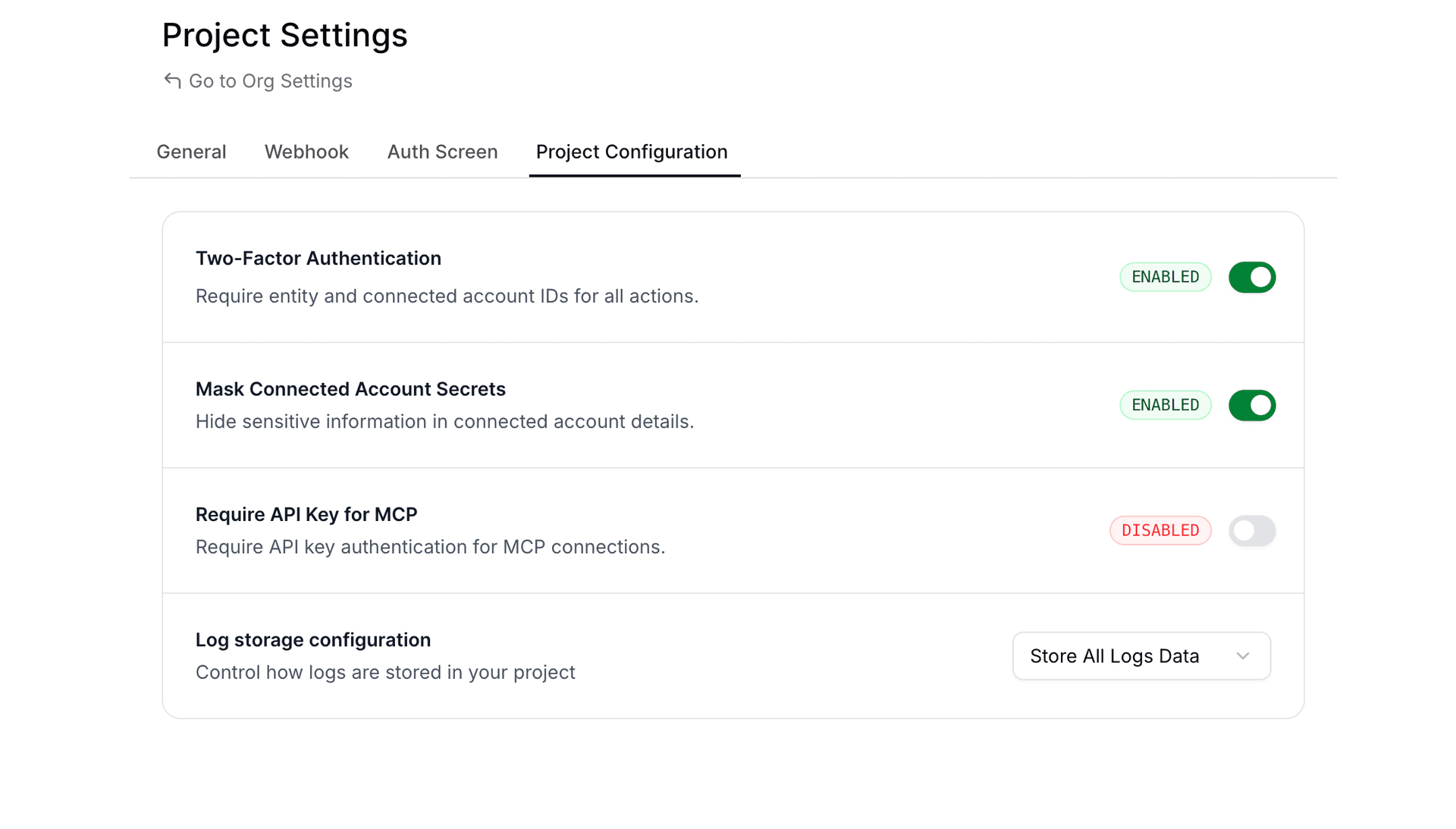
A new "Require API Key for MCP" toggle is now available in your Project Settings. When enabled, all requests to your MCP servers must include a valid Composio API key in the request headers.
| Setting | Default | Impact |
|---|---|---|
require_mcp_api_key | false | Opt-in; no changes to existing behavior |
How It Works
When the setting is disabled (default):
- MCP servers work without API key authentication
- Existing integrations continue to function unchanged
When the setting is enabled:
- All MCP requests must include the
x-api-keyheader with a valid Composio API key - Requests without a valid API key receive
401 Unauthorized - Only API keys belonging to the same project are accepted
Request Examples
Without API key (when enforcement is enabled):
curl -X POST "https://mcp.composio.dev/{your_mcp_server_url}" \
  -H "Content-Type: application/json" \
  -d '{"jsonrpc":"2.0","id":1,"method":"initialize"}'

# Response: 401 Unauthorized
With API key:
curl -X POST "https://mcp.composio.dev/{your_mcp_server_url}" \
  -H "Content-Type: application/json" \
  -H "x-api-key: ak_your_api_key" \
  -d '{"jsonrpc":"2.0","id":1,"method":"initialize"}'

# Response: 200 OK
Enabling the Setting
Via Dashboard
- Navigate to Project Settings
- Go to the Project Configuration tab
- Find the "Require API Key for MCP" toggle
- Enable the toggle
Via API
Update your project configuration using the API:
curl -X PATCH "https://backend.composio.dev/api/v3/org/project/config" \
  -H "Content-Type: application/json" \
  -H "x-api-key: ak_your_api_key" \
  -d '{"require_mcp_api_key": true}'
Response:
{
  "require_mcp_api_key": true,
  "is_2FA_enabled": true,
  "mask_secret_keys_in_connected_account": true,
  "log_visibility_setting": "show_all"
}
Via Code
import requests

response = requests.patch(
    "https://backend.composio.dev/api/v3/org/project/config",
    headers={
        "Content-Type": "application/json",
        "x-api-key": "ak_your_api_key"
    },
    json={"require_mcp_api_key": True}
)

print(response.json())
const response = await fetch(
"https://backend.composio.dev/api/v3/org/project/config",
{
method: "PATCH",
headers: {
"Content-Type": "application/json",
"x-api-key": "ak_your_api_key"
},
body: JSON.stringify({ require_mcp_api_key: true })
}
);
console.log(await response.json());When to Use This
Enable API key enforcement when you need to:
- Prevent unauthorized access to your MCP servers
- Control which applications can interact with your MCP endpoints
- Add an extra security layer for production deployments
- Audit and track MCP server usage through API key attribution
API Reference
Get Current Setting
GET /api/v3/org/project/configUpdate Setting
PATCH /api/v3/org/project/config{
"require_mcp_api_key": true
}Consistent Error Response Structure
Tool execution errors now return a standardized response format across all failure types. Previously, the data field was empty on errors—now it always includes status_code and message, matching the structure of successful responses.
What Changed
All error responses from tool execution now include:
data.status_code: HTTP status code (ornullfor non-HTTP errors)data.message: Detailed error messageerror: Same detailed message at the top level
Before vs After
Previous error response:
{
  "data": {},
  "successfull": false,
  "error": "404 Client Error: Not Found for url: ...",
}
New error response:
{
  "data": {
      "http_error": "404 Client Error: Not Found for url: ...",
      "status_code": 404,
      "message": "Resource not found: The requested item does not exist"
  },
  "successfull": false,
  "error": "Resource not found: The requested item does not exist",
}
Why This Matters
- Easier parsing: Agents and code can reliably access error details from
data.messagewithout special-casing emptydataobjects - Better debugging: Detailed error messages replace generic HTTP error strings
- Consistent schema: Same response shape whether the tool succeeds or fails
Union Types Preserved in Tool Schemas
Tool schemas now use standard JSON Schema anyOf for union types, providing accurate type information for LLMs and code generators.
What Changed
Two changes affect how types appear in request/response schemas:
| Change | Scope | Description |
|---|---|---|
| Nullable fields | All toolkits | Fields that accept null now use anyOf: [{type}, {type: "null"}] instead of type + nullable: true |
| Multi-type fields | 157 toolkits | Fields accepting multiple value types (e.g., string | number) preserve the full anyOf array instead of flattening to the first type |
Before vs After
For example, the GOOGLECALENDAR_GET_CURRENT_DATE_TIME request schema changes:
Previous (only a single type):
{
  "timezone": {
    "default": 0,
    "description": "Timezone specification...",
    "title": "Timezone",
    "type": "string"
  }
}
Now (Union types preserved):
{
  "timezone": {
    "anyOf": [
      { "type": "string" },
      { "type": "number" }
    ],
    "default": 0,
    "description": "Timezone specification...",
    "title": "Timezone"
  }
}
Similarly, nullable fields like page_token in GOOGLECALENDAR_LIST_CALENDARS:
Previous:
{
  "page_token": {
    "default": null,
    "description": "Token for the page of results to return...",
    "nullable": true,
    "title": "Page Token",
    "type": "string"
  }
}
Now:
{
  "page_token": {
    "anyOf": [
      { "type": "string" },
      { "type": "null" }
    ],
    "default": null,
    "description": "Token for the page of results to return...",
    "title": "Page Token"
  }
}
Why This Matters
- Accurate schemas: LLMs and code generators see the full set of allowed types
- Better validation: Input validation can now correctly accept all valid types, not just the first one
Deprecating BEARER_TOKEN auth scheme for 19 toolkits
We've deprecated the BEARER_TOKEN auth scheme for the following 19 toolkits:
AirtableDiscordDiscordbotGmailGoogle ClassroomGoogle Search ConsoleGoogle CalendarGoogle DocsGoogle DriveGoogle SlidesGoogle SuperInstagramNtfySapling AISlackSlackbotTawk ToTikTokTwitter
Recommendation
For these toolkits, we recommend using alternative auth schemes (for example, OAUTH2, API_KEY, or other toolkit-supported schemes) instead of BEARER_TOKEN.
Backward compatibility (explicit)
This change is fully backward compatible:
- Existing auth configs and connected accounts created with
BEARER_TOKENwill continue to function. - Creating new auth configs and connected accounts with
BEARER_TOKENwill continue to work (e.g., via API/SDK). - To discourage new usage,
BEARER_TOKENauth configs / connected accounts will not be displayed in the UI for these toolkits.
Binary Data Support for Proxy Execute
The /api/v3/tools/execute/proxy endpoint now supports binary data for both file uploads and downloads.
File Uploads (binary_body)
To upload a file via the proxy, use the binary_body field in your request payload. This supports two approaches: specifying either a URL pointing to the file or providing the base64-encoded content directly.
Upload File via URL
curl --location 'https://backend.composio.dev/api/v3/tools/execute/proxy' \
  --header 'accept: application/json' \
  --header 'x-api-key: <YOUR_API_KEY>' \
  --header 'Content-Type: application/json' \
  --data '{
    "endpoint": "/upload-endpoint",
    "method": "POST",
    "connected_account_id": "<CONNECTED_ACCOUNT_ID>",
    "binary_body": {
      "url": "{URL_TO_THE_FILE}"
    }
  }'
Upload File via Base64 Content
Supported up to 4MB file size.
curl --location 'https://backend.composio.dev/api/v3/tools/execute/proxy' \
  --header 'accept: application/json' \
  --header 'x-api-key: <YOUR_API_KEY>' \
  --header 'Content-Type: application/json' \
  --data '{
    "endpoint": "/upload-endpoint",
    "method": "POST",
    "connected_account_id": "<CONNECTED_ACCOUNT_ID>",
    "binary_body": {
      "base64": "JVBERi0xLjQKJ...<base64_data>...",
      "content_type": "application/pdf"
    }
  }'
File Downloads (binary_data)
When the proxied request returns a binary response (for example, a PDF or image), the proxy automatically uploads the file to temporary storage, and you receive a signed URL in the binary_data field. This enables you to download large files securely.
File Download Request
curl --location 'https://backend.composio.dev/api/v3/tools/execute/proxy' \
  --header 'accept: application/json' \
  --header 'x-api-key: <YOUR_API_KEY>' \
  --header 'Content-Type: application/json' \
  --data '{
    "endpoint": "{YOUR_ENDPOINT}",
    "method": "GET",
    "connected_account_id": "{YOUR_CONNECTED_ACCOUNT_ID}"
  }'
File Download Response
{
  "data": {},
  "binary_data": {
    "url": "url to the file",
    "content_type": "content type of the file",
    "size": "size of the file",
    "expires_at": "expires at of the file"
  },
  "status": "status code of the response",
  "headers": "headers of the response"
}
Summary
| Feature | Field | Description |
|---|---|---|
| File Upload via URL | binary_body.url | Provide a URL pointing to the file to upload |
| File Upload via Base64 | binary_body.base64 + binary_body.content_type | Provide base64-encoded content (up to 4MB) |
| File Download | binary_data in response | Receive a signed URL to download binary responses |
We'd love your feedback on the new proxy execute capabilities. If anything feels unclear or you have suggestions for improvement, please reach out.
Webhook Payload V3 - Lookahead Announcement
We're introducing Webhook Payload V3 - a redesigned webhook structure that follows industry standards and provides better developer experience. This update affects how you receive trigger events via webhooks and Pusher.
What's Changing?
New Webhook Structure
We're adopting the Standard Webhooks specification for better consistency and reliability.
Headers
A new header will identify the webhook version:
x-composio-webhook-version: V3Payload Structure
The payload structure is being reorganized to separate Composio metadata from trigger data:
Before (V2):
{
  "log_id": "log_TpxVOLXYnwXZ",
  "timestamp": "2025-12-23T13:06:07.695Z",
  "type": "gmail_new_gmail_message",
  "data": {
    "connection_id": "a1b2c3d4-5e6f-7a8b-9c0d-1e2f3a4b5c6d",
    "connection_nano_id": "ca_xYz9AbCdEfGh",
    "trigger_nano_id": "ti_JZFoTyYKbzhB",
    "trigger_id": "7f8e9d0c-1b2a-3c4d-5e6f-7a8b9c0d1e2f",
    "user_id": "usr-demo-12a3b4c5...",
    // ... actual trigger data mixed with metadata
  }
}
After (V3):
{
  "id": "msg_a1b2c3d4-5e6f-7a8b-9c0d-1e2f3a4b5c6d",
  "timestamp": "2025-12-23T13:06:07.695Z",
  "type": "composio.trigger.message",
  "metadata": {
    "log_id": "log_TpxVOLXYnwXZ",
    "trigger_slug": "GMAIL_NEW_GMAIL_MESSAGE",
    "auth_config_id": "ac_aCYTppZ5RsRc",
    "connected_account_id": "ca_cATYssZ5RrSc",
    "trigger_id": "ti_JZFoTyYKbzhB",
    "user_id": "pg-test-86c9fc84..."
  },
  "data": {
    // Clean trigger data without Composio metadata
  }
}
Key Improvements
- Metadata Separation: Composio-specific fields (connection IDs, trigger IDs, user IDs) are now in a dedicated
metadataobject - Clean Data: The
datafield now contains only the actual trigger payload without infrastructure metadata - Standardized Type Field: The
typefield now follows a consistent format (composio.trigger.message) instead of trigger-specific names likegmail_new_gmail_message - Trigger Slug in Metadata: The trigger slug (e.g.,
GMAIL_NEW_GMAIL_MESSAGE) is now available inmetadata.trigger_slugfor easy identification - Standards Compliance: Follows Standard Webhooks specification for better interoperability
- Consistent Structure: Same payload structure for both webhooks and Pusher channels
Migration Guide
Updating Your Webhook Handlers
If you're accessing Composio metadata fields, update your code:
# Before (V2)
trigger_type = payload["type"]  # "gmail_new_gmail_message"
connection_id = payload["data"]["connection_id"]
trigger_id = payload["data"]["trigger_id"]
message_text = payload["data"]["message_text"]

# After (V3)
trigger_type = payload["type"]  # "composio.trigger.message"
trigger_slug = payload["metadata"]["trigger_slug"]  # "GMAIL_NEW_GMAIL_MESSAGE"
connection_id = payload["metadata"]["connected_account_id"]
trigger_id = payload["metadata"]["trigger_id"]
message_text = payload["data"]["message_text"]
// Before (V2)
const triggerSlug = payload.type; // "gmail_new_gmail_message"
const connectionId = payload.data.connection_id;
const triggerId = payload.data.trigger_id;
const messageText = payload.data.message_text;
// After (V3)
const webhookType = payload.type; // "composio.trigger.message"
const triggerSlug = payload.metadata.trigger_slug; // "GMAIL_NEW_GMAIL_MESSAGE"
const connectionId = payload.metadata.connected_account_id;
const triggerId = payload.metadata.trigger_id;
const messageText = payload.data.message_text;Checking Webhook Version
You can detect the webhook version from headers:
webhook_version = headers.get("x-composio-webhook-version", "V2")
if webhook_version == "V3":
    # Use new structure
    metadata = payload["metadata"]
else:
    # Use old structure
    metadata = payload["data"]
Rollout Timeline
- December 2025: V3 released, opt-in via project settings
- February 15, 2026: All new organizations will default to V3
- Existing organizations: Continue using V2 by default, can opt-in to V3 anytime
How to Opt-In
- Go to your project settings in the Composio dashboard
- Navigate to the Webhooks section
- Select "Webhook Payload Version: V3"
- Update your webhook handlers to use the new structure
- Test thoroughly before enabling in production
Organizations created before February 15, 2026 will remain on V2 by default. You can switch to V3 at your convenience.
Organizations created on or after February 15, 2026 will use V3 by default.
Benefits
- Better DX: Clear separation between metadata and actual trigger data
- Standards Compliance: Follows industry-standard webhook specifications
- Consistency: Same structure across webhooks and Pusher channels
- Future-Proof: Built on established standards for long-term compatibility
Need Help?
If you have questions about migrating to V3 or need assistance:
- Join our Discord community
- Check our documentation
- Contact support at support@composio.dev
Authentication & Configuration Updates Across Multiple Toolkits
Summary
This release includes significant authentication and configuration improvements across 16+ toolkits. The changes standardize Base URL handling, modernize authentication methods, and fix various endpoint configurations to improve reliability and flexibility.
| Toolkit | Change Type | Description |
|---|---|---|
| Make | Breaking | Removed Region field, replaced with Base URL |
| Linear | Improvement | Base URL is no longer configurable |
| Kibana | Improvement | Removed default value for Base URL |
| Insightly | Fix | Added default value for Pod field |
| HelloBar | Deprecated | Deprecated bearer authentication |
| Gong | Fix | Added default value for Base URL |
| FormSite | Deprecated | Deprecated bearer auth, added API key authentication |
| DataScope | Fix | Fixed Get Current User Endpoint |
| D2L Brightspace | Fix | Updated Get Current User Endpoint |
| ClickUp | Fix | Changed Base URL field type |
| Bubble | Breaking | Fixed Base URL field, removed Subdomain |
| Brilliant Directories | Fix | Implemented dynamic Base URL for user endpoint |
| Braintree | Improvement | Updated to production defaults with dynamic endpoints |
| Auth0 | Improvement | Replaced hardcoded endpoint with dynamic tenant Base URL |
Breaking Changes
We verified that active usage for these toolkits is practically zero before proceeding with these changes.
Make Toolkit
- Removed Region field in favor of explicit Base URL configuration
- Users must now provide the full Base URL instead of selecting a region
- This change provides more flexibility for custom deployments and regional endpoints
Bubble Toolkit
- Removed Subdomain field and restructured Base URL handling
- Users must now provide the complete Base URL instead of just the Subdomain
- This change standardizes URL configuration across all toolkits
Deprecated Features
HelloBar Toolkit
- Bearer authentication is now deprecated
- While still functional, users are encouraged to migrate to newer authentication methods
- Support for bearer tokens will be removed in a future release
FormSite Toolkit
- Bearer authentication deprecated in favor of API key authentication
- New integrations should use API key authentication for improved security
- Existing bearer token implementations will continue to work but should be migrated
Improvements & Fixes
Configuration Improvements
Linear Toolkit - Base URL is no longer a configurable field. The toolkit now uses a fixed endpoint, simplifying the authentication process.
Kibana Toolkit - Removed the default value for Base URL, allowing for more flexible deployment configurations. Users can now specify custom Kibana instances without overriding defaults.
Gong Toolkit - Added a sensible default value for Base URL to simplify initial setup. New users can connect without manually configuring the endpoint.
Insightly Toolkit - Added default value for the Pod field to streamline configuration. Reduces setup complexity for standard deployments.
ClickUp Toolkit - Fixed the Base URL field type for proper validation and handling. Ensures consistent URL formatting across all operations.
Dynamic Endpoint Updates
Brilliant Directories Toolkit - Implemented dynamic Base URL resolution for the Get Current User Endpoint. Automatically adapts to different deployment environments.
Braintree Toolkit - Updated configuration to use production defaults. Implemented dynamic endpoint resolution for better environment handling. Improved reliability for production deployments.
Auth0 Toolkit - Replaced hardcoded endpoints with dynamic tenant-based URL resolution. Supports multi-tenant deployments without manual configuration. Automatically constructs the correct endpoint based on the tenant configuration.
Endpoint Fixes
DataScope Toolkit - Fixed the Get Current User Endpoint to use the correct API path. Resolves authentication verification issues.
D2L Brightspace Toolkit - Updated the Get Current User Endpoint to match the latest API specifications. Ensures proper user identification and session validation.
Migration Guide
For toolkits with breaking changes, please update your configurations as follows:
- Make: Replace Region with the full Base URL (e.g.,
https://us-east-1.make.com) - Bubble: Replace Subdomain with the full Base URL (e.g.,
https://myapp.bubbleapps.io)
For deprecated authentication methods:
- HelloBar & FormSite: Generate new API keys from your account settings and update your authentication configuration
Authentication Updates Across Multiple Toolkits
We've updated authentication configurations for several toolkits to improve security, fix issues, and support additional deployment options.
Summary
| Toolkit | Change Type | Action Required |
|---|---|---|
| Ashby | Deprecated | No |
| Freshdesk | Deprecated | No |
| Freshservice | Deprecated | No |
| Make | Breaking | New auth config + user reconnect |
| Mixpanel | Fix | No |
| Recall AI | Breaking | New auth config + user reconnect |
| Relevance AI | Breaking | New auth config + user reconnect |
| SmartRecruiters | Breaking | New auth config + user reconnect |
| Supabase | Improvement | No |
| Trello | Deprecated | No |
| ZoomInfo | Deprecated | No |
Breaking Changes
These toolkits had incorrect or outdated authentication configurations that needed fixing. We verified that active usage for these toolkits is practically zero before proceeding with these changes.
Impact: Existing connections will stop working. You'll need to create new auth configs and ask affected users to reconnect.
Make
Replaced region-based configuration with full base URL input. Users now provide the complete Make instance URL (e.g., https://us2.make.com or https://us1.make.celonis.com) instead of just a region code.
Recall AI
Updated from region-based to full base URL configuration. Fixed field descriptions and metadata. Updated categories to AI/Productivity/Communication and added proper documentation links.
Relevance AI
Simplified authentication by removing deprecated Project ID field. Added conditional mapping for region codes to API subdomains (AU→f1db6c, EU→d7b62b, US→bcbe5a). Region field now defaults to US.
SmartRecruiters
Fixed OAuth configuration with correct SmartRecruiters endpoints. Added proper default scopes for candidates, jobs, and users. Enabled PKCE and added refresh token support.
Deprecated (Still Working)
These changes introduce new auth methods while keeping old ones functional:
Ashby
Added new API Key authentication scheme with automatic base64 encoding and proper authorization headers.
No Action Required: Old Basic Auth method is deprecated but continues to work. Existing connections are unaffected.
Freshdesk
Added new API Key authentication scheme requiring subdomain and API key with automatic base64 encoding.
No Action Required: Old Basic Auth method is deprecated but continues to work. Existing connections are unaffected.
Freshservice
Added new API Key authentication scheme requiring subdomain and API key with automatic base64 encoding.
No Action Required: Old Basic Auth method is deprecated but continues to work. Existing connections are unaffected.
Trello
Marked Bearer Token authentication as deprecated in favor of OAuth authentication.
No Action Required: Old Bearer auth continues to function. OAuth is recommended for new connections.
ZoomInfo
Added new OAuth2 authentication scheme with comprehensive scopes for contacts, companies, audiences, scoops, news, and intent data. Deprecated the old JWT-based Basic authentication. Password field now properly marked as secret.
No Action Required: Old JWT auth continues to function. New connections will use OAuth2.
Non-Breaking Improvements
Mixpanel
Fixed region mapping logic for data residency. Added proper conditional evaluation to map regions to correct API hosts (EU, India, or Standard). Region field is now optional and defaults to Standard server. Service account secret now properly marked as secret.
No Action Required: Existing connections continue to work without changes.
Supabase
Changed base_url field type from auth_config_field to connection_field for both OAuth and API Key schemes. Updated base action logic to respect user-provided base URLs, enabling support for self-hosted Supabase instances.
No Action Required: Existing connections continue to work. Self-hosted instances now supported.
Toolkit Deprecation: Removing Empty Toolkits
What's Changed
We're deprecating 15 toolkits that currently have no supported actions. These toolkits will be reactivated once we add functional actions to them, ensuring you only see integrations that are ready to use.
Deprecated Toolkits
The following toolkits are now deprecated:
BREATHEHR,DIXA,EGNYTE,EXPENSIFY,FREEAGENTGUSTO,NUTSHELL,OPENNUTRITION,OYSTERHR,RAKUTENSALESFLARE,TEAMLEADER,WALGREENS,WHOOP,WIX
Impact on Your Integration
API Behavior Changes
List Toolkits Endpoint
The GET /toolkits endpoint will now exclude deprecated toolkits by default.
Need to see deprecated toolkits? Use the include_deprecated query parameter.
Backward Compatibility
Your existing integrations are safe. All other endpoints continue to work with deprecated toolkits:
- Retrieve the toolkit details
- Create auth configurations
- Manage connected accounts
- Configure MCP Servers
This ensures zero breaking changes to your current implementations.
Why This Matters
This change helps you:
- Focus on working integrations - No clutter from non-functional toolkits
- Avoid integration attempts with toolkits that have no actions
- Better developer experience with a cleaner, more actionable toolkit list
Questions?
If you have questions or need support with any deprecated toolkit, reach out to our team or check our documentation.
Toolkit Deprecation: Streamlining Our Platform
What's Changed
We're deprecating 60 toolkits that currently have no supported actions. These toolkits will be reactivated once we add functional actions to them, ensuring you only see integrations that are ready to use.
Deprecated Toolkits
The following toolkits are now deprecated:
ACCELO,ADOBE,AERO_WORKFLOW,AMAZON,APEX27APPOINTO,APPSFLYER,ATLASSIAN,AUTH0,AXONAUTBATTLENET,BOLDSIGN,BRAINTREE,BREEZY_HR,BREX_STAGINGBRIGHTPEARL,BROWSERHUB,CUSTOMER_IO,DEEL,DRIP_JOBSEPIC_GAMES,FACTORIAL,FITBIT,FRONT,GO_TO_WEBINARGURU,HELCIM,HIGHLEVEL,ICIMS_TALENT_CLOUD,IDEA_SCALEKEAP,LASTPASS,LEVER_SANDBOX,LEXOFFICE,MANY_CHATMBOUM,MICROSOFT_TENANT,MOXIE,ONCEHUB,POPTINPRECORO,PRINTNODE,QUALAROO,RAVENSEOTOOLS,RING_CENTRALRIPPLING,SAGE,SALESFORCE_MARKETING_CLOUD,SEISMIC,SMARTRECRUITERSTAPFORM,TERMINUS,TIMEKIT,TWITCH,VENLYVERO,VISME,WAVE_ACCOUNTING,WIZ,ZOHO_DESK
Impact on Your Integration
API Behavior Changes
List Toolkits Endpoint
The GET /toolkits endpoint will now exclude deprecated toolkits by default.
Need to see deprecated toolkits? Use the new include_deprecated query parameter.
Backward Compatibility
Your existing integrations are safe. All other endpoints continue to work with deprecated toolkits:
- Retrieve the toolkit details
- Create auth configurations
- Manage connected accounts
- Configure MCP Servers
This ensures zero breaking changes to your current implementations.
Why This Matters
This change helps you:
- Focus on working integrations - No clutter from non-functional toolkits
- Avoid integration attempts with toolkits that have no actions
- Better developer experience with a cleaner, more actionable toolkit list
Questions?
If you have questions or need support with any deprecated toolkit, reach out to our team or check our documentation.
Deprecation of is_local_toolkit Field and Removal of is_local Query Parameter
We're cleaning up the Toolkits API by deprecating the is_local_toolkit response field and removing the is_local query parameter filter.
What's Changing?
Response Field: is_local_toolkit (Deprecated)
The is_local_toolkit field in toolkit API responses is now deprecated. This field was originally intended to indicate whether a toolkit was local to a specific project, but it is no longer meaningful as no toolkits use this classification.
Affected Endpoints:
GET /api/v3/toolkits- List toolkitsGET /api/v3/toolkits/{slug}- Get single toolkitGET /api/v3/toolkits/multi- Get multiple toolkits
The field will continue to be returned in API responses for backward compatibility, but it will always return false. It is marked as deprecated: true in the OpenAPI specification.
Query Parameter: is_local (Removed)
The is_local query parameter filter has been removed from the following endpoints:
GET /api/v3/toolkitsGET /api/v3/toolkits/multi
This parameter was used to filter toolkits by their local status, but since no toolkits are classified as local, it served no practical purpose.
Impact on Your Code
If You're Using the is_local Query Parameter
Before:
// This will no longer work
const toolkits = await fetch('/api/v3/toolkits?is_local=true');
After:
// Simply remove the is_local parameter
const toolkits = await fetch('/api/v3/toolkits');
If You're Reading the is_local_toolkit Response Field
The field will continue to be present in responses but will always return false. You can safely ignore this field or remove any logic that depends on it.
Before:
const toolkit = await composio.toolkits.get('github');
if (toolkit.is_local_toolkit) {
  // This condition will never be true
  handleLocalToolkit(toolkit);
}
After:
const toolkit = await composio.toolkits.get('github');
// Remove is_local_toolkit checks - they're no longer meaningfulTool Router General Availability
The Composio SDKs achieved a significant milestone with Tool Router moving from experimental to stable production status in December 2025. The Tool Router is now a fully supported feature that enables creating isolated MCP sessions with scoped toolkit access across both Python 0.10.1 and TypeScript 0.3.0.
Major Achievements
Native Tool Execution: Both SDKs now support direct tool execution through Tool Router sessions. The TypeScript implementation emphasizes improved type safety and error handling, while Python developers benefit from better integration with provider-wrapped tools.
Webhook Security: A new verification method was introduced. The system now provides secure webhook endpoint validation and signature verification for incoming webhooks, enhancing protection for trigger-based workflows.
Framework Compatibility: The stable Tool Router integrates with multiple AI platforms including OpenAI, Anthropic, LangChain, LlamaIndex, CrewAI, and Vercel AI SDK.
Technical Improvements
The TypeScript SDK resolved significant CommonJS compatibility issues by switching bundlers. This addresses a common developer pain point, particularly for Node.js projects not using ES modules.
The Python SDK extended LangChain provider support to version 1, while simultaneously fixing a critical KeyError occurring when SUPABASE_BETA_RUN_SQL_QUERY is used with Agents.
Migration Path
Users upgrading from experimental APIs should note the simplified approach—the Tool Router API now operates directly rather than through experimental namespaces, with comprehensive migration documentation provided.
Removal of label query parameter from connected accounts API
The label query parameter has been removed from the GET /api/v3/connected_accounts endpoint.
What's changing?
The label query parameter is no longer supported when listing connected accounts. This parameter was previously accepted but had no functional behavior since label ingestion was removed in an earlier update.
Impact
None - This is a cleanup change. The label query parameter was not performing any filtering since the underlying label ingestion functionality was already removed. If your code was passing this parameter, it was being silently ignored.
Migration
No action required. If your code was passing the label query parameter, you can safely remove it from your API calls.
Enhanced Security Masking for Sensitive Fields
We've improved the security masking for REDACTED fields in the following APIs:
What's Changed: Sensitive fields are now partially masked, revealing only the first 4 characters to help with debugging while maintaining security.
Example:
Before: REDACTED
After:  abcd...
Disabling Masking
If you need to disable masking for your use case, you have two options:
- Via UI: Navigate to Project Settings → Configuration tab and update the masking settings
- Via API: Use the Patch Project Config API
Typed Responses Across Toolkits
We've updated many toolkits so their outputs are now strongly typed objects instead of a generic response_data blob, meaning tools like Outlook, HubSpot, Notion, etc. now return well-shaped, documented fields you can rely on directly in your code and agents. These improvements apply to the latest toolkit versions—see our toolkit versioning docs for how versions are managed.
Breaking Change for latest Version
If you're using the latest version and your code post-processes the old response_data structure, you'll need to update your code to work with the new flattened, typed response schemas.
Why This Matters
- Better developer experience for direct execute: clear fields and types
- Improved agent performance: flatter output shapes with explicit fields reduce nesting and invalid params
- Clearer docs and type safety: richer metadata for IDEs and autocomplete
Before vs After
Previous (generic, version 20251202_00):
{
  "data": {
    "response_data": { "...": "..." }
  },
  "successful": true
}
Now (typed example – Outlook List Messages, version 20251209_00):
{
  "data": {
    "@odata.context": "https://graph.microsoft.com/v1.0/$metadata#users('me')/messages",
    "@odata.nextLink": "https://graph.microsoft.com/v1.0/me/messages?$skip=10",
    "value": [
      {
        "id": "abc123",
        "subject": "Hi there",
        "from": { "emailAddress": { "address": "a@b.com", "name": "Alice" } },
        "hasAttachments": true
      }
    ]
  },
  "successful": true
}
For the exact field mapping per toolkit, open platform.composio.dev → Toolkits → List Messages (or the relevant tool).
Migration Notes
- Breaking change for consumers on the
latestversion who post-process the old nestedresponse_datashape: outputs are now flattened and explicitly typed. - New and modified fields include richer descriptions and examples; some legacy placeholders were removed.
- Re-fetch schemas for your tool/version to see the typed definitions. Use the toolkit view in
platform.composio.devfor authoritative field details.
Transition to Self-Managed Credentials for Select Applications
This is a non-breaking change. Your existing integrations will continue to work as expected. This change only affects new integrations with the applications listed below.
What's Changing?
Starting today, the following applications will require your own developer credentials instead of Composio-managed credentials:
- Auth0
- Blackbaud
- BoldSign
- Deel
- Front
- GoToWebinar
- PagerDuty
- Pipedrive
- Shopify
- Strava
- SurveyMonkey
- Webex
What You Need to Do
To continue using these applications with Composio:
- Create Developer Accounts: Register for developer accounts on the platforms you need
- Generate API Credentials: Create OAuth apps following each platform's documentation
- Configure in Composio: Add your credentials to Composio using custom auth configs
- Test Your Integration: Test your integration with the new credentials
All other Composio applications continue to work with Composio-managed credentials. This change only affects the 12 applications listed above.
Connected Account Expiration for Incomplete Connections
We're implementing automatic expiration for connected accounts that remain in incomplete states, helping maintain a cleaner and more efficient authentication system.
What's Changing?
Connected accounts in Initializing and Initiated states will now automatically expire after 10 minutes. This applies to connection attempts that were started but never completed.
Why This Matters
This change provides:
- Better Resource Management: Automatically cleans up incomplete connection attempts
- Improved System Hygiene: Prevents accumulation of stale, unused connection records
- Enhanced User Experience: Reduces clutter from abandoned authentication flows
This is a non-breaking change. Your existing integrations and completed connections will continue to work as expected. This change only affects connection attempts that are never completed.
Questions?
If you have any questions about this change, please reach out to our support team or check our Connected Accounts documentation.
Required API Key Authentication for MCP URLs
We're strengthening the security of Model Context Protocol (MCP) URLs by making API key authentication mandatory for all requests.
What's Changing?
Starting December 15th, 2025, all new Composio projects must include the x-api-key header when making requests to MCP URLs. This header authenticates your application and ensures secure communication with the Composio platform.
Why This Matters
This change provides:
- Enhanced Authentication: Ensures only authorized applications can access MCP endpoints
- Industry Best Practices: Aligns with standard API security patterns
Impact on Existing Projects
For existing projects: We value backward compatibility and understand the need for a smooth transition. Your existing MCP URLs will continue to work without the x-api-key header until April 15th, 2026.
Important: After April 15th, 2026, all MCP URL requests without the x-api-key header will be rejected. Please ensure you update your applications before this date to avoid service disruption.
Note: If you're already passing the x-api-key header in your MCP requests, no action is required—you're all set!
Migration Guide
To adopt this security enhancement in your existing projects:
- Locate Your API Key: Find your API key in the Composio dashboard under Project Settings
- Update Your Code: Add the
x-api-keyheader to all MCP URL requests - Test Thoroughly: Verify the updated requests work in your development environment
- Deploy: Roll out the changes to your production environment
Questions?
If you have any questions about this security enhancement or need assistance with migration, please reach out to our support team or check our MCP documentation.
Toolkit Version Support for Triggers
Summary
Added toolkit version support to trigger operations (create and getType) in both Python and TypeScript SDKs. This allows users to explicitly specify which toolkit version to use when creating trigger instances and retrieving trigger type information, ensuring consistent behavior across different toolkit versions.
Trigger operations now respect the global toolkitVersions configuration set during Composio initialization, providing better control over which trigger versions are used in your applications.
Key Changes
TypeScript SDK (ts/packages/core/)
- Added
toolkit_versionsparameter totriggers.create()method- Passes the global toolkit versions configuration when creating trigger instances
- Defaults to
'latest'when no version is specified
- Modified
triggers.getType()to respect global toolkit versions- Now accepts toolkit version configuration to fetch trigger types for specific versions
- Improved error messages to include version-related fixes
- Updated trigger type documentation with comprehensive examples
- Added behavior documentation explaining version usage patterns
Python SDK (python/composio/core/models/)
- Added
toolkit_versionsparameter totriggers.create()method- Uses global toolkit version configuration when creating trigger instances
- Converts
Nonetoomitfor API compatibility
- Modified
triggers.get_type()to respect toolkit versions- Implemented custom method replacing direct client binding
- Passes toolkit version configuration to API calls
- Added comprehensive docstrings explaining version behavior
Behavior
Creating Triggers with Toolkit Versions:
// TypeScript - Configure versions at initialization
const composio = new Composio({
  apiKey: 'your-api-key',
  toolkitVersions: {
    gmail: '12082025_00',
    github: '10082025_01'
  }
});

// Create trigger - uses version '12082025_00' for Gmail
const trigger = await composio.triggers.create('user@example.com', 'GMAIL_NEW_MESSAGE', {
  connectedAccountId: 'ca_abc123',
  triggerConfig: {
    labelIds: 'INBOX',
    userId: 'me',
    interval: 60,
  },
});
# Python - Configure versions at initialization
composio = Composio(
api_key="your-api-key",
toolkit_versions={"gmail": "12082025_00", "github": "10082025_01"}
)
# Create trigger - uses version '12082025_00' for Gmail
trigger = composio.triggers.create(
slug="GMAIL_NEW_MESSAGE",
user_id="user@example.com",
trigger_config={"labelIds": "INBOX", "userId": "me", "interval": 60}
)Retrieving Trigger Types with Specific Versions:
// TypeScript
const composio = new Composio({
  apiKey: 'your-api-key',
  toolkitVersions: { github: '10082025_01' }
});

// Get trigger type for specific version
const triggerType = await composio.triggers.getType('GITHUB_COMMIT_EVENT');
// Returns trigger type for version '10082025_01'
# Python
composio = Composio(
api_key="your-api-key",
toolkit_versions={"github": "10082025_01"}
)
# Get trigger type for specific version
trigger_type = composio.triggers.get_type("GITHUB_COMMIT_EVENT")
# Returns trigger type for version '10082025_01'Benefits
- Version Control: Explicitly specify which toolkit version to use for triggers
- Consistency: Ensure trigger behavior remains consistent across toolkit updates
- Testing: Test trigger integrations with specific versions before updating
- Debugging: Easier to debug issues by pinning to specific toolkit versions
- Production Safety: Avoid unexpected changes from automatic version updates
Migration Guide
This is a non-breaking change. Existing code will continue to work with default behavior:
Before (still works):
// Uses 'latest' version by default
const trigger = await composio.triggers.create('user', 'GITHUB_COMMIT_EVENT', {...});
After (recommended for production):
// Explicitly configure versions for better control
const composio = new Composio({
  apiKey: 'your-api-key',
  toolkitVersions: { github: '10082025_01' }
});

const trigger = await composio.triggers.create('user', 'GITHUB_COMMIT_EVENT', {...});
For more details on toolkit versioning, see the Toolkit Versioning documentation.
Enhanced MCP URL Security Requirements
We're introducing improved security requirements for Model Context Protocol (MCP) URLs to ensure better isolation between user connections and prevent unauthorized access.
What's Changing?
Starting today, all new Composio projects must include at least one of the following parameters in their MCP URLs:
user_id- Identifies the specific userconnected_account_id- Identifies the specific connected account
Why This Matters
This change ensures that:
- User Isolation: Each user's connections remain completely separate from others
- Enhanced Security: Prevents potential cross-user data access scenarios
- Better Multi-Tenancy: Enables safer multi-tenant application architectures
- Explicit Access Control: Forces developers to explicitly specify which user or account context they're operating in
Impact on Existing Projects
For existing projects: We understand the importance of backward compatibility. While we've sent email notifications to project owners about upgrading their MCP URLs, your existing integrations will continue to work until January 15th, 2026.
Important: After January 15th, 2026, MCP URLs without user_id or connected_account_id query parameters will no longer be supported. Please ensure you update your MCP URLs before this date to avoid service disruption.
Note: If your MCP URLs already include either user_id or connected_account_id query parameters, no action is required—you can safely ignore this notice.
Implementation Example
Before:
https://platform.composio.dev/v3/mcp/{id}After (with user_id):
https://platform.composio.dev/v3/mcp/{id}?user_id=user_123After (with connected_account_id):
https://platform.composio.dev/v3/mcp/{id}?connected_account_id=ca_xyzMigration Guide
If you're using an existing project and want to adopt this security enhancement:
- Review your current MCP URL configuration
- Add either
user_idorconnected_account_idparameter to your URLs - Update your application code to pass the appropriate identifier
- Test the updated URLs in your development environment
For more details on choosing the right user identifiers for your application, see our User Management documentation.
Questions?
If you have any questions about this security enhancement or need assistance with migration, please reach out to our support team or check our MCP documentation.
Adds Version Checks for Tool Execution and Improved Execution Speed in TS SDK
Summary
Added version validation for manual tool execution to prevent unexpected behavior when using latest toolkit versions. This ensures users explicitly specify toolkit versions when executing tools manually, while allowing flexibility through a skip flag.
This release also eliminates a lot of redundant API calls made to check connected account during tool execution, effectively increasing the performance of tool execution.
Key Changes
Python SDK (python/)
- Added
ToolVersionRequiredErrorexception with detailed error messages and fix suggestions - Added
dangerously_skip_version_checkparameter toexecute()method - Modified
_execute_tool()to validate version is notlatestunless skip flag is set - Automatically passes
dangerously_skip_version_check=Truefor agentic provider flows - Added comprehensive test coverage (19 test methods) in
test_tool_execution.py
TypeScript SDK (ts/packages/core/)
- Added
ComposioToolVersionRequiredErrorerror class with possible fixes - Added
dangerouslySkipVersionCheckparameter to execute flow - Modified tool execution to validate version before API calls
- Updated execution type definitions in
tool.types.tsandmodifiers.types.ts - Updated test files with date-based version format (
20251201_xx) - Improved tool execution by eliminating redundant API calls
Behavior
Before: Tools could be executed with latest version, risking unexpected behavior on toolkit updates
After: Manual execution requires specific version or explicit skip flag:
# Raises ToolVersionRequiredError
tools.execute("GITHUB_CREATE_ISSUE", {...})

# Works - explicit version
tools.execute("GITHUB_CREATE_ISSUE", {...}, version="20251201_01")

# Works - configured toolkit versions
tools = Tools(client, provider, toolkit_versions={"github": "20251201_01"})

# Works - with skip flag (use cautiously)
tools.execute("GITHUB_CREATE_ISSUE", {...}, dangerously_skip_version_check=True)
Breaking Changes
Manual tool execution without version specification now throws an error. Users must either:
- Pass explicit version parameter
- Configure toolkit versions in SDK initialization
- Set environment variable
COMPOSIO_TOOLKIT_VERSION_<TOOLKIT_SLUG> - Use
dangerously_skip_version_check=Trueflag
MCP (Model Control Protocol) & Experimental ToolRouter
Composio now introduces comprehensive MCP (Model Control Protocol) support and an experimental ToolRouter for creating isolated, scoped sessions with advanced toolkit management. These features enable seamless integration with modern AI frameworks and provide powerful session-based tool routing capabilities.
Why Use MCP & ToolRouter?
- Framework Integration: Native MCP support for Vercel AI, Mastra, OpenAI Agents, and LangChain
- Session Isolation: Create isolated sessions with specific toolkit configurations
- Advanced Authentication: Flexible auth config management per toolkit
- Scoped Access: Control which tools are available within each session
- Multi-Service Workflows: Route tool calls efficiently across different services
- Development & Testing: Perfect for testing and development with scoped MCP server access
TypeScript SDK (v0.1.53)
Added: MCP API
Core MCP Features:
- MCP Server Creation: Create and manage MCP server configurations
- User-Specific URLs: Generate unique MCP server URLs for individual users
- Toolkit Configuration: Support for multiple toolkits with custom auth configs
- Tool Filtering: Specify allowed tools per configuration
- Connection Management: Choose between manual and automatic account management
Basic Usage:
import { Composio } from '@composio/core';

const composio = new Composio({
  apiKey: process.env.COMPOSIO_API_KEY,
});

// Create MCP configuration
const mcpConfig = await composio.mcp.create('my-server-name', {
  toolkits: [
    { toolkit: 'github', authConfigId: 'ac_233434343' },
    { toolkit: 'gmail', authConfigId: 'ac_567890123' }
  ],
  allowedTools: ['GITHUB_CREATE_ISSUE', 'GMAIL_SEND_EMAIL'],
  manuallyManageConnections: false,
});

// Generate server instance for a user
const serverInstance = await composio.mcp.generate('user123', mcpConfig.id);
console.log('MCP URL:', serverInstance.url);
Framework Integration Examples:
// Vercel AI Integration
import { SSEClientTransport } from '@modelcontextprotocol/sdk/client/sse.js';
import { experimental_createMCPClient as createMCPClient } from 'ai';

const mcpClient = await createMCPClient({
  name: 'composio-mcp-client',
  transport: new SSEClientTransport(new URL(serverInstance.url)),
});

// Mastra Integration
import { MCPClient as MastraMCPClient } from '@mastra/mcp';

const mcpClient = new MastraMCPClient({
  servers: {
    composio: { url: new URL(mcpSession.url) },
  },
});

// OpenAI Agents Integration
import { hostedMcpTool } from '@openai/agents';

const tools = [
  hostedMcpTool({
    serverLabel: 'composio',
    serverUrl: mcpSession.url,
  }),
];
Added: Experimental ToolRouter
Core ToolRouter Features:
- Session-Based Routing: Create isolated sessions for specific users and toolkit combinations
- Dynamic Configuration: Configure toolkits and auth configs per session
- MCP Server URLs: Each session gets a unique MCP server endpoint
- Flexible Toolkit Management: Support for string names or detailed toolkit configurations
- Connection Control: Manual or automatic connection management per session
Basic Usage:
// Create session with simple toolkit names
const session = await composio.experimental.toolRouter.createSession('user_123', {
  toolkits: ['gmail', 'slack', 'github'],
});

// Create session with auth configs
const session = await composio.experimental.toolRouter.createSession('user_456', {
  toolkits: [
    { toolkit: 'gmail', authConfigId: 'ac_gmail_work' },
    { toolkit: 'slack', authConfigId: 'ac_slack_team' },
    { toolkit: 'github', authConfigId: 'ac_github_personal' },
  ],
  manuallyManageConnections: true,
});

console.log('Session ID:', session.sessionId);
console.log('MCP URL:', session.url);
Advanced Multi-Service Integration:
// Complex workflow session
const integrationSession = await composio.experimental.toolRouter.createSession('user_789', {
  toolkits: [
    { toolkit: 'gmail', authConfigId: 'ac_gmail_work' },
    { toolkit: 'slack', authConfigId: 'ac_slack_team' },
    { toolkit: 'github', authConfigId: 'ac_github_personal' },
    { toolkit: 'notion', authConfigId: 'ac_notion_workspace' },
    { toolkit: 'calendar', authConfigId: 'ac_gcal_primary' },
  ],
});

// Use with any MCP client
const mcpClient = new MCPClient(integrationSession.url);
Framework-Specific Examples:
// Mastra Integration
const mcpSession = await composio.experimental.toolRouter.createSession(userId, {
  toolkits: ["gmail"],
  manuallyManageConnections: true,
});

const agent = new MastraAgent({
  name: 'Gmail Assistant',
  model: openai('gpt-4o-mini'),
  tools: await mcpClient.getTools(),
});

// OpenAI Agents Integration
const tools = [
  hostedMcpTool({
    serverLabel: 'composio tool router',
    serverUrl: mcpSession.url,
    requireApproval: {
      never: { toolNames: ['GMAIL_FETCH_EMAILS'] },
    },
  }),
];
Python SDK (v0.8.17)
Added: MCP Support
Core MCP Features:
- Server Configuration: Create and manage MCP server configurations
- Toolkit Management: Support for both simple toolkit names and detailed configurations
- Authentication Control: Per-toolkit auth config specification
- Tool Filtering: Specify allowed tools across all toolkits
- User Instance Generation: Generate user-specific MCP server instances
Basic Usage:
from composio import Composio

composio = Composio()

# Create MCP server with toolkit configurations
server = composio.mcp.create(
    'personal-mcp-server',
    toolkits=[
        {
            'toolkit': 'github',
            'auth_config_id': 'ac_xyz',
        },
        {
            'toolkit': 'slack',
            'auth_config_id': 'ac_abc',
        },
    ],
    allowed_tools=['GITHUB_CREATE_ISSUE', 'SLACK_SEND_MESSAGE'],
    manually_manage_connections=False
)

# Generate server instance for a user
mcp_instance = server.generate('user_12345')
print(f"MCP URL: {mcp_instance['url']}")
Simple Toolkit Usage:
# Using simple toolkit names
server = composio.mcp.create(
    'simple-mcp-server',
    toolkits=['composio_search', 'text_to_pdf'],
    allowed_tools=['COMPOSIO_SEARCH_DUCK_DUCK_GO_SEARCH', 'TEXT_TO_PDF_CONVERT_TEXT_TO_PDF']
)

# All tools from toolkits (default behavior)
server = composio.mcp.create(
    'all-tools-server',
    toolkits=['composio_search', 'text_to_pdf']
    # allowed_tools=None means all tools from these toolkits
)
LangChain Integration:
import asyncio
from composio import Composio
from langchain_mcp_adapters.client import MultiServerMCPClient
from langgraph.prebuilt import create_react_agent

composio = Composio()

mcp_config = composio.mcp.create(
    name="langchain-slack-mcp",
    toolkits=[{"toolkit": "slack", "auth_config_id": "<auth-config-id>"}],
)

mcp_server = mcp_config.generate(user_id='<user-id>')

client = MultiServerMCPClient({
    "composio": {
        "url": mcp_server["url"],
        "transport": "streamable_http",
    }
})

async def langchain_mcp(message: str):
    tools = await client.get_tools()
    agent = create_react_agent("openai:gpt-4.1", tools)
    response = await agent.ainvoke({"messages": message})
    return response

response = asyncio.run(langchain_mcp("Show me 20 most used slack channels"))
Added: Experimental ToolRouter
Core ToolRouter Features:
- Session Management: Create isolated tool routing sessions for users
- Toolkit Configuration: Support for both simple toolkit names and detailed configurations
- Session Isolation: Each session gets its own MCP URL and session ID
- Flexible Authentication: Per-session auth config management
- Scoped Tool Access: Control which tools are available within each session
Basic Usage:
from composio import Composio

composio = Composio()

# Create a tool router session
session = composio.experimental.tool_router.create_session(
    user_id='user_123',
    toolkits=['github', 'slack'],
    manually_manage_connections=False
)

print(f"Session ID: {session['session_id']}")
print(f"MCP URL: {session['url']}")
Advanced Configuration:
# Create session with detailed toolkit configurations
session = composio.experimental.tool_router.create_session(
    user_id='user_456',
    toolkits=[
        {
            'toolkit': 'github',
            'auth_config_id': 'ac_github_123'
        },
        {
            'toolkit': 'slack',
            'auth_config_id': 'ac_slack_456'
        }
    ],
    manually_manage_connections=True
)

# Minimal session (no specific toolkits)
session = composio.experimental.tool_router.create_session(
    user_id='user_789'
)
Integration with AI Frameworks:
import asyncio
from composio import Composio
from langchain_mcp_adapters.client import MultiServerMCPClient

composio = Composio()

# Create tool router session
session = composio.experimental.tool_router.create_session(
    user_id='ai_user',
    toolkits=['composio_search', 'text_to_pdf']
)

# Use with LangChain MCP client
client = MultiServerMCPClient({
    "composio": {
        "url": session["url"],
        "transport": "streamable_http",
    }
})

async def use_tool_router():
    tools = await client.get_tools()
    # Use tools in your AI workflow
    return tools

tools = asyncio.run(use_tool_router())
Migration Guide
TypeScript SDK: Migrating to New MCP API
The new MCP API provides enhanced functionality and better integration patterns. Here's how to migrate from the previous MCP implementation:
Before (Legacy MCP)
// Legacy MCP approach (still accessible via deprecated.mcp)
import { Composio } from '@composio/core';

const composio = new Composio();

// Old MCP server creation
const legacyMCP = await composio.deprecated.mcp.createServer({
  name: 'my-server',
  toolkits: ['github', 'gmail'],
});

// Direct URL usage
const mcpUrl = legacyMCP.url;
After (New MCP API)
// New MCP API approach
import { Composio } from '@composio/core';

const composio = new Composio({
  apiKey: process.env.COMPOSIO_API_KEY,
});

// Step 1: Create MCP configuration
const mcpConfig = await composio.mcp.create('my-server', {
  toolkits: [
    { toolkit: 'github', authConfigId: 'ac_github_123' },
    { toolkit: 'gmail', authConfigId: 'ac_gmail_456' }
  ],
  allowedTools: ['GITHUB_CREATE_ISSUE', 'GMAIL_SEND_EMAIL'],
  manuallyManageConnections: false,
});

// Step 2: Generate user-specific server instance
const serverInstance = await composio.mcp.generate('user_123', mcpConfig.id);
const mcpUrl = serverInstance.url;
Key Migration Changes
-
Two-Step Process:
- Before: Single step server creation
- After: Create configuration, then generate user instances
-
Enhanced Configuration:
- Before: Simple toolkit names only
- After: Detailed toolkit configs with auth, tool filtering, connection management
-
User-Specific URLs:
- Before: Single server URL for all users
- After: Unique URLs per user for better isolation
-
Backward Compatibility:
- Legacy Access: Old MCP functionality remains available via
composio.deprecated.mcp - Gradual Migration: Migrate at your own pace without breaking existing implementations
- Legacy Access: Old MCP functionality remains available via
Migration Benefits
- Better Security: User-specific sessions with isolated access
- Enhanced Control: Fine-grained toolkit and tool management
- Framework Integration: Native support for modern AI frameworks
- Scalability: Better resource management and user isolation
Migration Timeline
- Phase 1: New MCP API available alongside legacy implementation
- Phase 2: Legacy MCP accessible via
deprecated.mcpnamespace - Phase 3: Full deprecation (timeline to be announced)
Recommendation: Start new projects with the new MCP API and gradually migrate existing implementations to benefit from enhanced features and better framework integration.
Key Benefits & Use Cases
Development & Testing
- Isolated Environments: Test different toolkit combinations without affecting production
- Scoped Access: Limit tool access for security and testing purposes
- Framework Flexibility: Works with any MCP-compatible client or framework
Production Workflows
- Multi-Service Integration: Seamlessly combine tools from different services
- User-Specific Sessions: Each user gets their own isolated session with appropriate permissions
- Authentication Management: Fine-grained control over authentication per toolkit
Framework Compatibility
- Vercel AI: Native integration with Vercel AI SDK
- Mastra: Full support for Mastra agents and workflows
- OpenAI Agents: Direct integration with OpenAI's agent framework
- LangChain: Complete LangGraph and LangChain compatibility
- Custom Clients: Works with any MCP-compatible client
Enterprise Features
- Session Management: Track and manage multiple user sessions
- Resource Control: Limit concurrent sessions and resource usage
- Audit Trail: Full logging and monitoring of tool usage
- Security: Isolated sessions prevent cross-user data access
Migration & Compatibility
Both MCP and ToolRouter features are designed to complement existing Composio functionality:
// Can be used alongside regular tool management
const regularTools = await composio.tools.get({ toolkits: ['github'] });
const mcpSession = await composio.experimental.toolRouter.createSession(userId, {
  toolkits: ['gmail', 'slack']
});

// Both approaches can coexist and serve different purposes
The experimental ToolRouter API provides a preview of advanced session management capabilities, while the MCP API offers production-ready Model Control Protocol support for modern AI frameworks.
Bug Fixes
Fixed: ToolRouter Dependency Issue
Python SDK (v0.8.19)
Issue Fixed:
- ToolRouter Functionality: Fixed ToolRouter tests that were failing due to missing
tool_routerattribute in HttpClient - Dependency Update: Updated
composio-clientdependency from version 1.9.1 to 1.10.0+ to include ToolRouter functionality - Version Compatibility: Resolved compatibility issues between ToolRouter implementation and client library
Details:
ToolRouter functionality was briefly broken in versions 0.8.15 to 0.8.18 due to a dependency version mismatch. The composio-client library version 1.9.1 did not include the tool_router attribute, causing all ToolRouter integration tests to fail with AttributeError: 'HttpClient' object has no attribute 'tool_router'.
This has been fixed in version 0.8.19 by:
- Updating the
composio-clientdependency to version 1.10.0+ - Ensuring all ToolRouter functionality is now available
- All ToolRouter integration tests now pass successfully
Previous Issue:
# This would fail in versions 0.8.15-0.8.18
session = composio.experimental.tool_router.create_session(user_id='test')
# AttributeError: 'HttpClient' object has no attribute 'tool_router'
Fixed in 0.8.19:
# This now works correctly
session = composio.experimental.tool_router.create_session(user_id='test')
# Returns: {'session_id': '...', 'url': '...'}
Fixed: Missing Descriptions in Auth Config Fields
Python SDK (v0.8.17) & TypeScript SDK (v0.1.53)
Issue Fixed:
- Auth Config Connection Fields: Added missing descriptions to toolkit auth configuration connection fields
- Auth Config Creation Fields: Added missing descriptions to toolkit auth configuration creation fields
- Field Documentation: Improved field documentation and help text for better developer experience
Details: Previously, when developers were setting up auth configurations for toolkits, many fields lacked proper descriptions, making it difficult to understand what information was required. This fix ensures all auth config fields now include:
- Clear, descriptive field labels
- Helpful placeholder text where appropriate
- Detailed explanations of field requirements
This improvement affects all toolkits and makes the authentication setup process more intuitive and error-free.
Toolkit Versioning in SDKs
Composio Toolkit Versioning provides granular control over tool versions across all your integrations. Instead of always using the latest version of tools, developers can now specify exact toolkit versions, ensuring consistent behavior and controlled updates in production environments.
Why Use Toolkit Versioning?
- Version Stability: Pin specific toolkit versions to avoid unexpected changes in production
- Controlled Updates: Test new toolkit versions before deploying to production
- Environment Consistency: Ensure the same toolkit versions across development, staging, and production
- Rollback Capability: Easily revert to previous toolkit versions if issues arise
- Fine-grained Control: Set different versions for different toolkits based on your needs
Python SDK (v0.8.11)
Added
- Toolkit Versioning Support: New
toolkit_versionsparameter for controlling tool versions- Added
toolkit_versionsparameter toComposioclass initialization - Support for global version setting (e.g.,
'latest') - Support for per-toolkit version mapping (e.g.,
{'github': '20250902_00', 'slack': '20250902_00'}) - Environment variable support with
COMPOSIO_TOOLKIT_VERSION_<TOOLKIT_NAME>pattern - New
toolkit_version.pyutility module for version resolution logic
- Added
Examples:
# Global version for all toolkits, only `latest` is supported
composio = Composio(toolkit_versions='latest')

# Per-toolkit version mapping
composio = Composio(toolkit_versions={
    'github': '20250902_00',
    'slack': '20250902_00',
    'gmail': '20250901_01'
})

# Using environment variables
# Set COMPOSIO_TOOLKIT_VERSION_GITHUB=20250902_00
composio = Composio()  # Automatically picks up env vars

# Get tools with specific versions
tools = composio.tools.get('default', {'toolkits': ['github']})
TypeScript SDK (v0.1.52)
Added
- Toolkit Versioning Support: Added
toolkitVersionsconfiguration option- New
toolkitVersionsparameter inComposioclass constructor - Support for global version string or per-toolkit version mapping
- Environment variable parsing with
getToolkitVersionsFromEnv()utility - Enhanced
getRawComposioToolBySlug()method for version-specific tool retrieval - Version-aware tool filtering and search capabilities
- New
Examples:
// Global version for all toolkits
const composio = new Composio({
  toolkitVersions: '20250902_00'
});

// Per-toolkit version mapping
const composio = new Composio({
  toolkitVersions: {
    'github': '20250902_00',
    'slack': '20250902_00',
    'gmail': '20250901_01'
  }
});

// Using environment variables
// Set COMPOSIO_TOOLKIT_VERSION_GITHUB=20250902_00
const composio = new Composio(); // Automatically picks up env vars

// Get specific tool version
const tool = await composio.tools.getRawComposioToolBySlug(
  'GITHUB_GET_REPO',
);

// Get tools with version-aware filtering
const tools = await composio.tools.get('default', {
  toolkits: ['github'],
  limit: 10
});
Key Benefits
- Environment Variables: Set
COMPOSIO_TOOLKIT_VERSION_<TOOLKIT_NAME>=<VERSION>for automatic version resolution - Flexible Configuration: Choose between global versions or per-toolkit version mapping
- Backward Compatibility: Existing code works unchanged - versioning is opt-in
- Version Fallback: Automatically falls back to 'latest' when no version is specified
- Cross-Platform Consistency: Identical developer experience across Python and TypeScript
Version Format
Toolkit versions follow the format: YYYYMMDD_NN (e.g., 20250902_00) or use 'latest' for the most recent version only supported at global scope and not individual toolkit level.
Environment Variables
# Set specific versions for different toolkits
export COMPOSIO_TOOLKIT_VERSION_GITHUB=20250902_00
export COMPOSIO_TOOLKIT_VERSION_SLACK=20250902_00
export COMPOSIO_TOOLKIT_VERSION_GMAIL=20250901_01
Migration Note
This feature is fully backward compatible. Existing code will continue to work without changes, using the latest versions by default. To enable versioning, simply add the toolkit_versions parameter during SDK initialization.
Additional Updates
- Package Updates: Bumped all Python provider packages to v0.8.10
- Documentation: Enhanced API documentation with versioning examples
- Testing: Added comprehensive test coverage (400+ new test cases) for versioning functionality
- Examples: New versioning examples demonstrating practical usage patterns
Introducing Composio Auth Links
Composio Auth Links provide a hosted authentication solution that eliminates the need for developers to build custom authentication forms. Instead of manually rendering OAuth consent screens, API key input forms, or custom authentication fields, developers can simply redirect users to a Composio-hosted URL that handles the entire authentication process automatically.
Why Use Auth Links?
- Zero UI Development: No need to build forms for OAuth, API keys, or custom fields like subdomains
- Universal Authentication: Works seamlessly across all supported third-party services
- Reduced Complexity: Replace complex OAuth flows with a simple redirect
- Better UX: Professional, consistent authentication experience for end users
- Faster Integration: Get authentication working in minutes, not hours
Python SDK (v0.8.11)
Added
- Composio Connect Link Support: New
link()method for creating external authentication links- Added
link()method toConnectedAccountsclass for generating user authentication links - Support for callback URL redirection after authentication
- Enhanced user experience with external link-based authentication flow
- No manual form rendering required - Composio handles all authentication UI
- Added
Examples:
# Basic usage - create a connection request
connection_request = composio.connected_accounts.link('user_123', 'auth_config_123')
redirect_url = connection_request.redirect_url
print(f"Visit: {redirect_url} to authenticate your account")

# Wait for the connection to be established
connected_account = connection_request.wait_for_connection()

# With callback URL
connection_request = composio.connected_accounts.link(
    'user_123',
    'auth_config_123',
    callback_url='<https://your-app.com/callback>'
)
TypeScript SDK (v0.1.51)
Added
- Composio Connect Links: Added support for composio connect links
- New
link()method inConnectedAccountsclass for generating authentication URLs - Support for callback URL redirection with
CreateConnectedAccountLinkOptions - Comprehensive TypeScript types and validation for link creation options
- Eliminates need for custom authentication forms - just redirect users to the link
- New
Examples:
// Basic usage - create a connection request
const connectionRequest = await composio.connectedAccounts.link('user_123', 'auth_config_123');
const redirectUrl = connectionRequest.redirectUrl;
console.log(`Visit: ${redirectUrl} to authenticate your account`);

// Wait for the connection to be established
const connectedAccount = await connectionRequest.waitForConnection();

// With callback URL
const connectionRequest = await composio.connectedAccounts.link('user_123', 'auth_config_123', {
  callbackUrl: '<https://your-app.com/callback>'
});
Key Benefits
- No Form Building: Composio handles OAuth consent, API key collection, and custom field inputs
- Hosted Authentication Flow: Professional UI that works across all supported services
- Callback URL Support: Control where users return after successful authentication
- Connection Waiting: Built-in polling to detect when authentication completes
- Cross-Platform Consistency: Identical developer experience across Python and TypeScript
Customisation
You can customise the app logo and name showed in the authentication page via the dashboard. Head over your project via platform.composio.dev and choose Settings → Auth Links to upload a new logo and change the name.
Migration Note
This feature replaces manual authentication form development with a simple redirect-based approach, significantly reducing integration time and complexity while providing a better user experience. Auth links are drop in replacement for composio.connectedAccounts.initate, you can safely swap this to composio.connectedAccounts.link